Zoho CRM 2026 Review: Best Tool for Sales Growth & Automation
What Is Zoho CRM and Who Is It For?
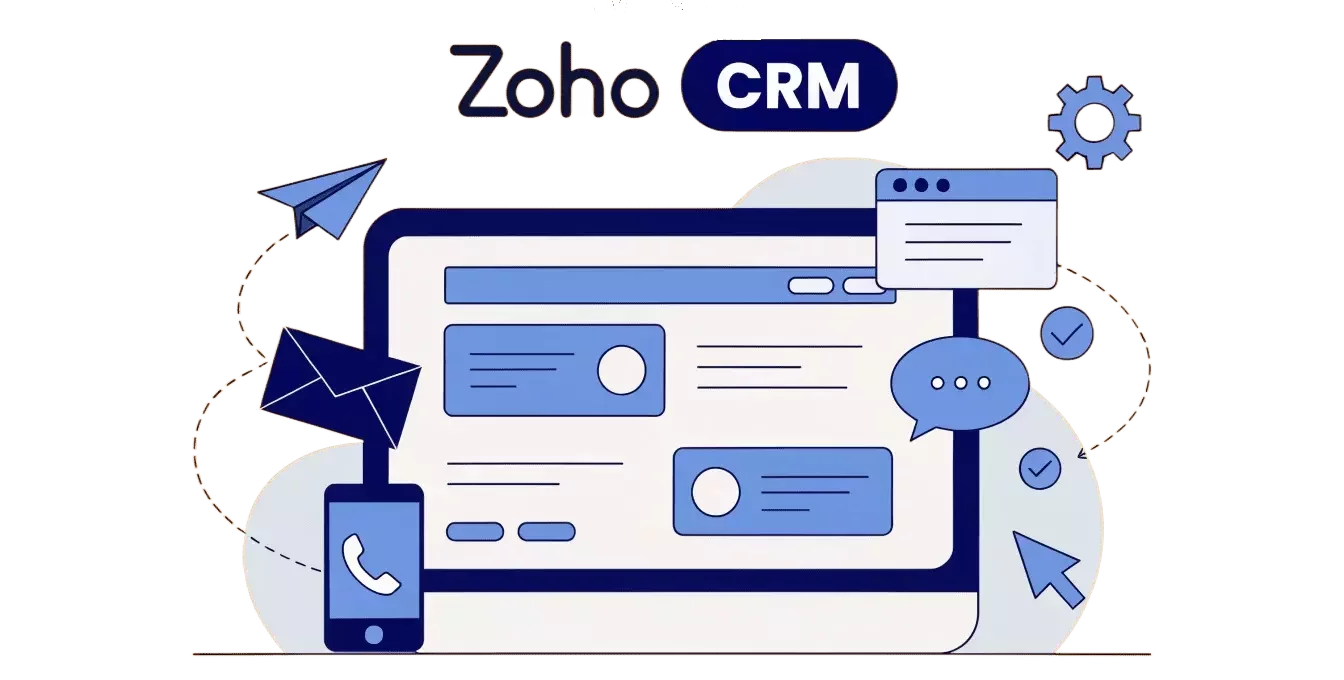
Zoho CRM is a cloud-based CRM platform built by Zoho Corporation, serving over 250,000 businesses worldwide. It's not just a contact database — it's a full-stack sales operating system with automation, analytics, AI, and integrations with dozens of third-party services.
Who Zoho CRM is built for:
SMBs (5–200 people) that need serious functionality without an enterprise price tag
SaaS companies with long sales cycles where pipeline visibility and lead scoring matter
B2B agencies — digital, consulting, PR — managing client relationships from first touch to renewal
eCommerce with a B2B layer where sales are driven by account managers, not just the storefront
Sales teams of 10+ where process standardization and pipeline management are non-negotiable
Who it's a poor fit for — we'll cover that honestly at the end. But upfront: if your business needs deeply bespoke customization or a highly specialized vertical workflow, expect significant setup costs regardless of which plan you're on.
More about which CRMs are suitable for different business sizes.
Zoho CRM Features in 2026
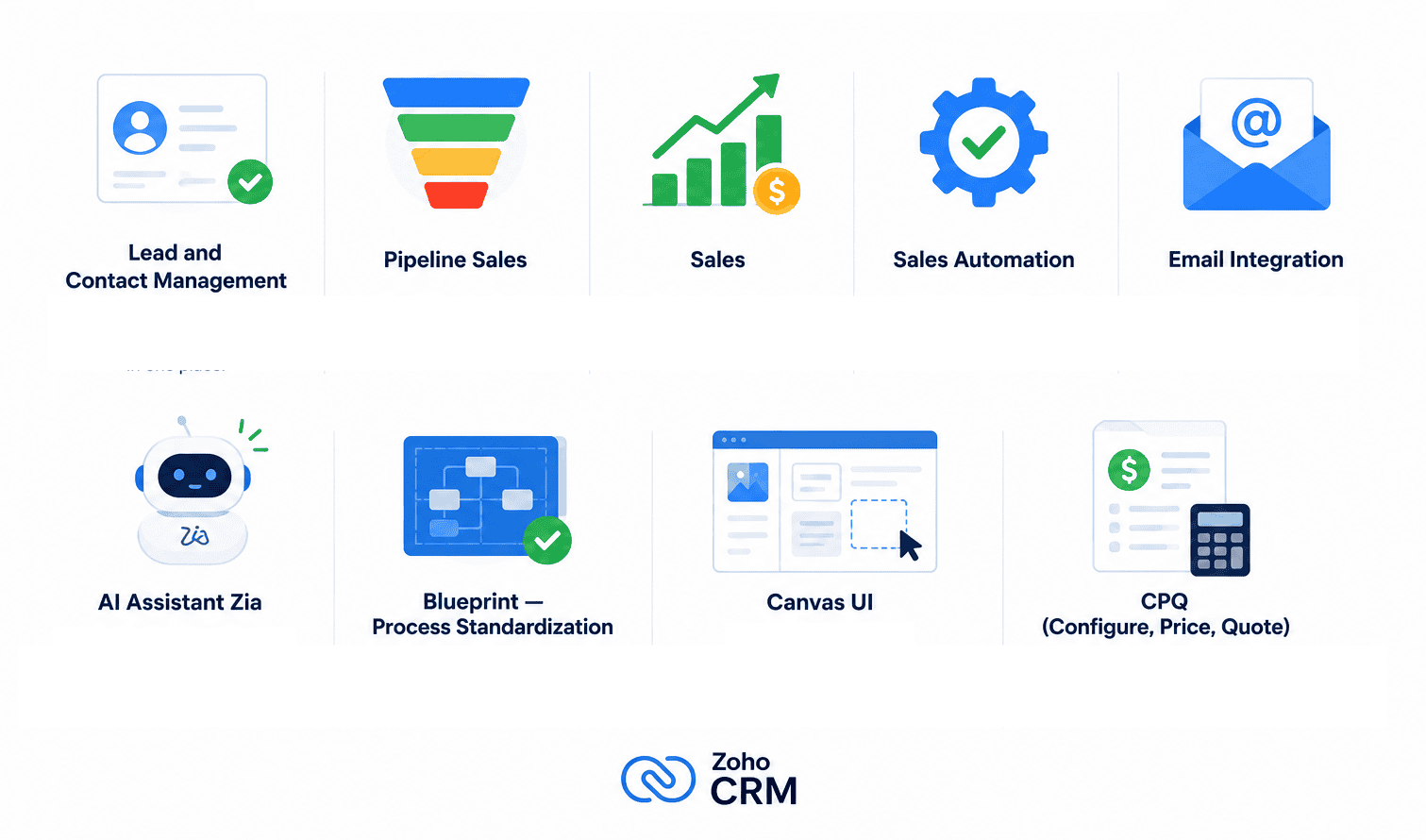
Lead and Contact Management
Zoho CRM captures leads from web forms, email, social channels, phone calls, and manual entry. Every lead has a full timeline of all interactions — from the first email to signed contract. Duplicates are automatically detected and merged.
Pipeline Sales
The sales pipeline is fully customizable: you can run multiple parallel pipelines for different products, markets, or customer segments. Drag-and-drop stage management, color-coded deal priority, automatic stagnation alerts when a deal sits idle too long — all available even on base plans.
Sales Automation
Workflows are where Zoho CRM genuinely shines. You can automate:
Emails triggered by deal stage changes
Lead assignment rules based on source, geography, or score
Task creation after every logged call
Field updates when conditions are met
Alerts for deals that haven't moved in N days
Email Integration
Two-way sync with Gmail, Outlook, and Zoho Mail. Emails automatically attach to the relevant contacts and deals. Templates, bulk email campaigns, open and click tracking — all in one place without a separate marketing tool.
AI Assistant Zia
Zia is Zoho's built-in AI layer, and in 2026 it's considerably more capable than a glorified search bar. Lead scoring, deal outcome prediction, next-step recommendations, email sentiment analysis, best time to contact — all included on Enterprise and Ultimate plans at no extra cost. More on Zia in a dedicated section below.
Blueprint — Process Standardization
Blueprint is one of the most underrated features in the Zoho CRM ecosystem. It's a visual business process builder: you literally diagram your sales process, define which steps are mandatory, who owns each stage, and what data must be filled in before a deal can advance. Essential for teams where reps "forget" to send proposals or skip qualification steps entirely.
Canvas UI
A genuinely unique feature in this price category: a no-code, drag-and-drop design studio for customizing record layouts. Instead of living with Zoho's default field arrangement, you redesign contact and deal cards to show exactly what your team needs — nothing more, nothing less. No developer required.
CPQ (Configure, Price, Quote)
Built for teams selling complex or configurable products. Automated proposal generation with custom pricing rules, discount logic, and product bundles. In Q1 2026, Zoho updated CPQ with Zia integration — the AI now analyzes historical quotes and surfaces the most effective product combinations at the point of quoting.
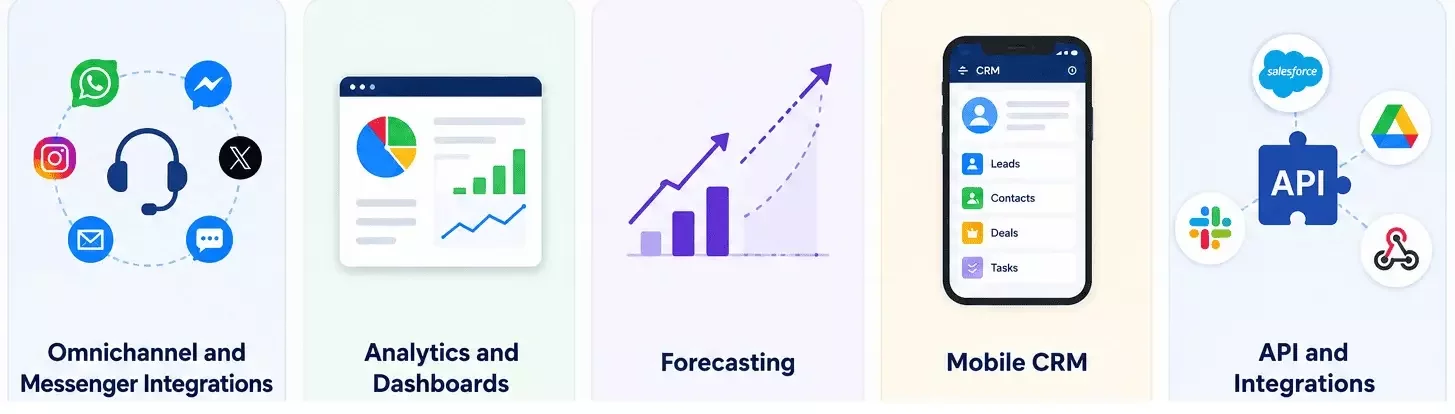
Omnichannel and Messenger Integrations
Zoho CRM supports communication through:
Email and telephony (built-in or via integration)
WhatsApp Business API
Telegram (via integration or Zoho SalesIQ)
LinkedIn Sales Navigator
SMS and live chat
One important caveat: native WhatsApp is available, but full-scale use typically requires a paid WhatsApp Business API provider (Twilio, 360dialog, etc.) — that's an additional cost not reflected in the CRM license.
Analytics and Dashboards
Reporting in Zoho CRM is considerably more powerful than most competitors at the same price point. Custom reports, cohort analysis, funnel visualization, anomaly detection — all available. The Ultimate plan unlocks Zoho Analytics, a full BI layer that can connect to external data sources.
Forecasting
Sales forecasting accounts for deal probabilities, Zia AI scores, and seasonality patterns — giving managers a realistic revenue outlook rather than a raw sum of open opportunities.
Mobile CRM
Full-featured iOS and Android apps: location check-ins for field sales, offline mode, voice notes, business card scanning via camera.
API and Integrations
A well-documented REST API. Native integrations with Google Workspace, Microsoft 365, Slack, Mailchimp, Zapier, Stripe, and hundreds of others. Zoho Marketplace hosts a wide library of pre-built extensions, though quality varies considerably between publishers.
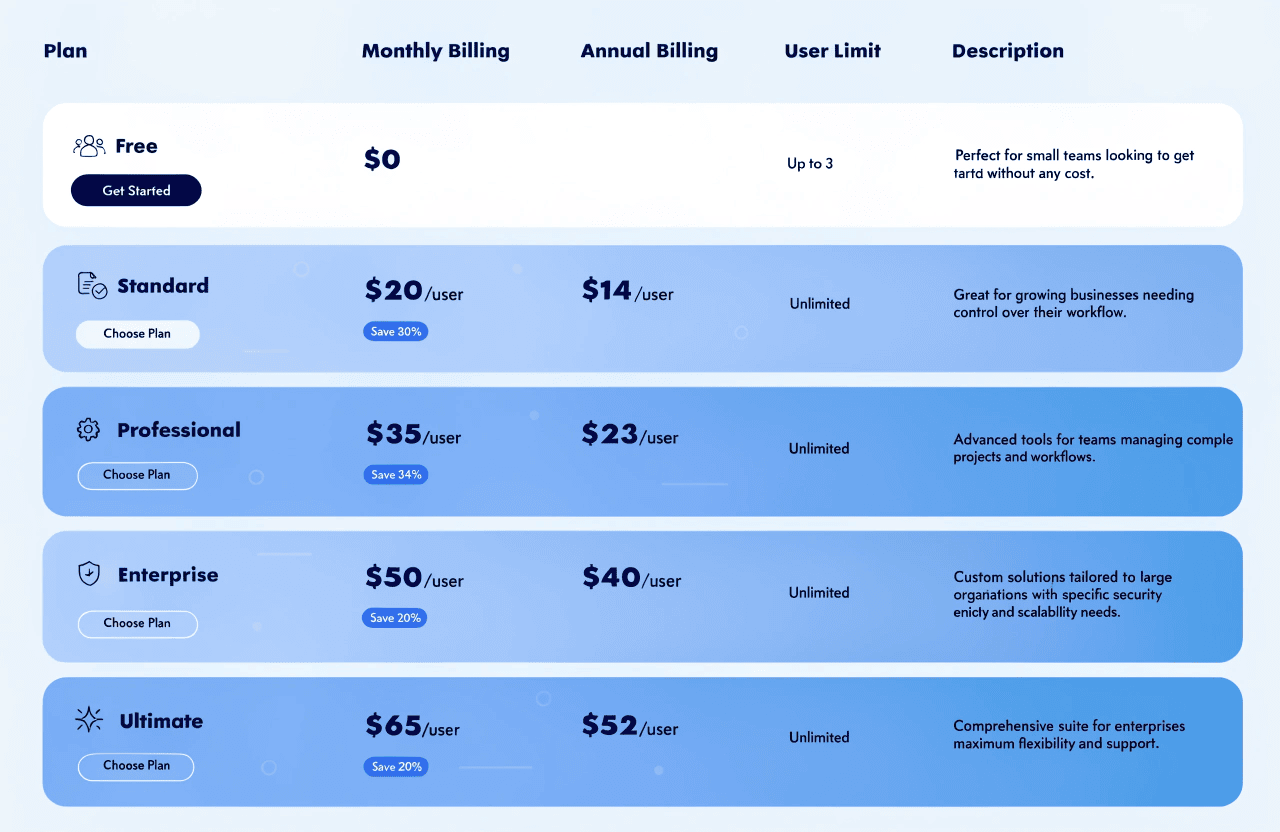
Full Zoho CRM Pricing Table 2026
What Zoho CRM Actually Costs: Real Business Scenarios
Startup, 5 People
Plan: Professional ($23/user/month annual)
Licenses: 5 × $23 × 12 = $1,380/year
Onboarding (self-managed): $0 + 2–3 weeks of setup time
Total year one: ~$1,400–$2,000
SMB, 20 People
Plan: Professional or Enterprise
Professional: 20 × $23 × 12 = $5,520/year
Enterprise: 20 × $40 × 12 = $9,600/year
Implementation via partner: $2,000–$4,000
Annual admin/support services: $1,000–$2,000
Total year one (Professional): ~$8,500–$11,500
Total year one (Enterprise): ~$12,600–$15,600
Sales Team, 50 People
Plan: Enterprise ($40/user/month annual)
Licenses: 50 × $40 × 12 = $24,000/year
Implementation: $5,000–$10,000
Integrations and ongoing customization: $2,000–$5,000/year
Total year one: $31,000–$39,000
Strengths and Weaknesses
Deep automation at competitive price points — Professional offers unlimited workflow rules. Most competitors either cap the number or gate this functionality behind higher-tier plans.
Significant savings over Salesforce — Enterprise at $40/user delivers comparable functionality to Salesforce Sales Cloud Professional at $80/user. Up to 50% cost reduction with no meaningful feature sacrifice for most use cases.
The Zoho ecosystem — 50+ natively integrated apps. No "Frankenstein stack" of ten disconnected SaaS tools, each with its own data model and API budget.
AI without a separate license — Zia is bundled into Enterprise and Ultimate. Compare this to Salesforce Einstein or HubSpot Breeze, which are priced as add-ons on top of base plans.
Blueprint — a process standardization tool with no real equivalent at this price point. If your sales process has mandatory steps that reps skip, Blueprint solves it.
Canvas UI — interface customization depth without requiring a developer.
True scalability — one platform that grows from a 5-person startup to a 500-person enterprise without a re-platforming event.
Onboarding complexity — consistently the top complaint in reviews across every major platform. Zoho CRM's flexibility is real, but that flexibility means there are dozens of configuration decisions to make before the system is useful. Without a technically capable admin or an external consultant, the first few weeks feel like a maze.
Dated UI in places — parts of the interface look like a 2015 product. Canvas UI addresses this for record layouts, but only for teams that invest the time in building the templates. Out of the box, the default experience can feel cluttered.
Zoho CRM vs Competitors 2026
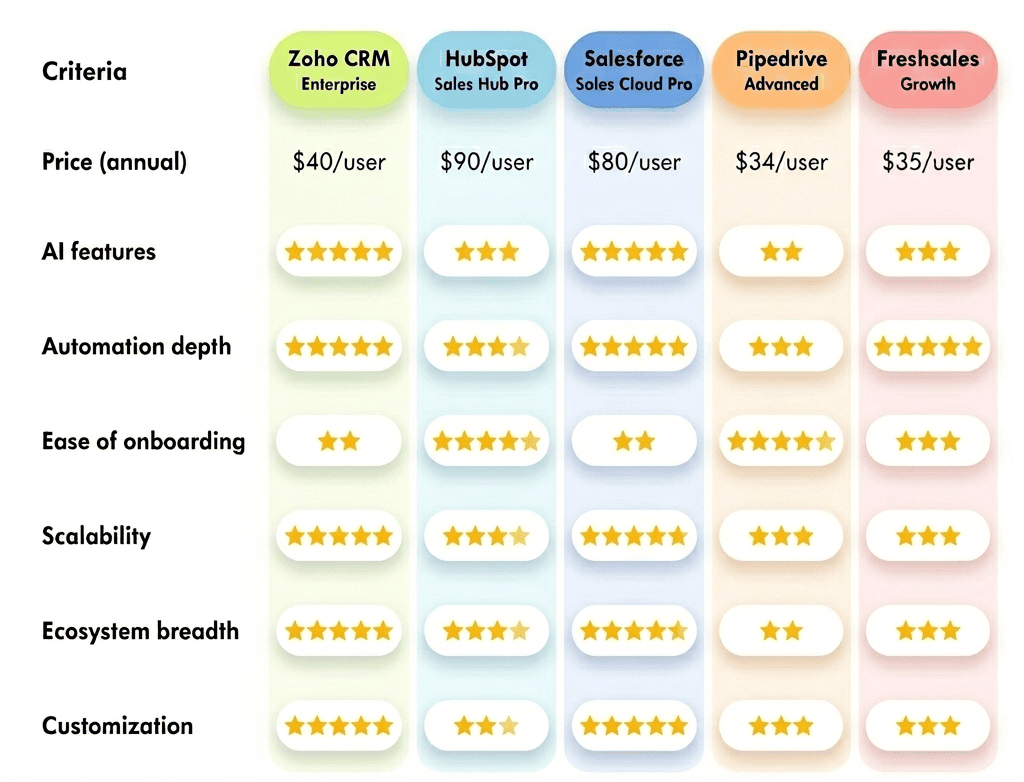
The Real Cost of Zoho CRM: Hidden Expenses
Implementation & setup: Zoho CRM is not plug-and-play. Expect 2–8 weeks of setup, and $1,500–$10,000 if using a partner or consultant.
Team training: Sales teams need structured onboarding sessions. Typical cost is $500–$1,500 plus internal time investment.
Integrations & add-ons: Basic integrations are free, but third-party tools (WhatsApp API, Zapier, marketing tools) add roughly $20–$200+ per month depending on usage.
Customization & development: Advanced setup (Blueprints, APIs, custom modules) often requires a developer at $30–$100/hour, especially for complex workflows.
Support & ecosystem: Zoho support can be slow on lower tiers, making Zoho One a more cost-efficient option for companies using multiple apps.
Who Should Choose Zoho CRM in 2026
Choose Zoho CRM if:
Your sales team is between 5 and 150 people
You sell B2B with a complex or multi-stage sales cycle
Process standardization matters to you (Blueprint is a genuine differentiator)
You want AI features without paying Salesforce prices
You plan to use multiple Zoho products — CRM + Books + Desk + Projects = Zoho One makes strong financial sense
Your budget is constrained but your functional requirements aren't
You have or can hire the technical resources for proper implementation
Industries where Zoho CRM performs particularly well: SaaS sales, IT services, consulting, real estate, financial services, manufacturing with B2B sales teams.
Get More Value from Zoho CRM
But the key isn't just buying a license. The key is implementing the system correctly.
That's where the CRMOZ team helps you get the most out of Zoho CRM:
configure your sales funnels
automate processes and Blueprints
integrate email, telephony, messengers, and APIs
set up AI Zia, Canvas UI, and analytics
deliver team onboarding and ongoing support