Zoho CRM AI Automation: Build Your Zia Agent Step by Step
What Changed in 2026
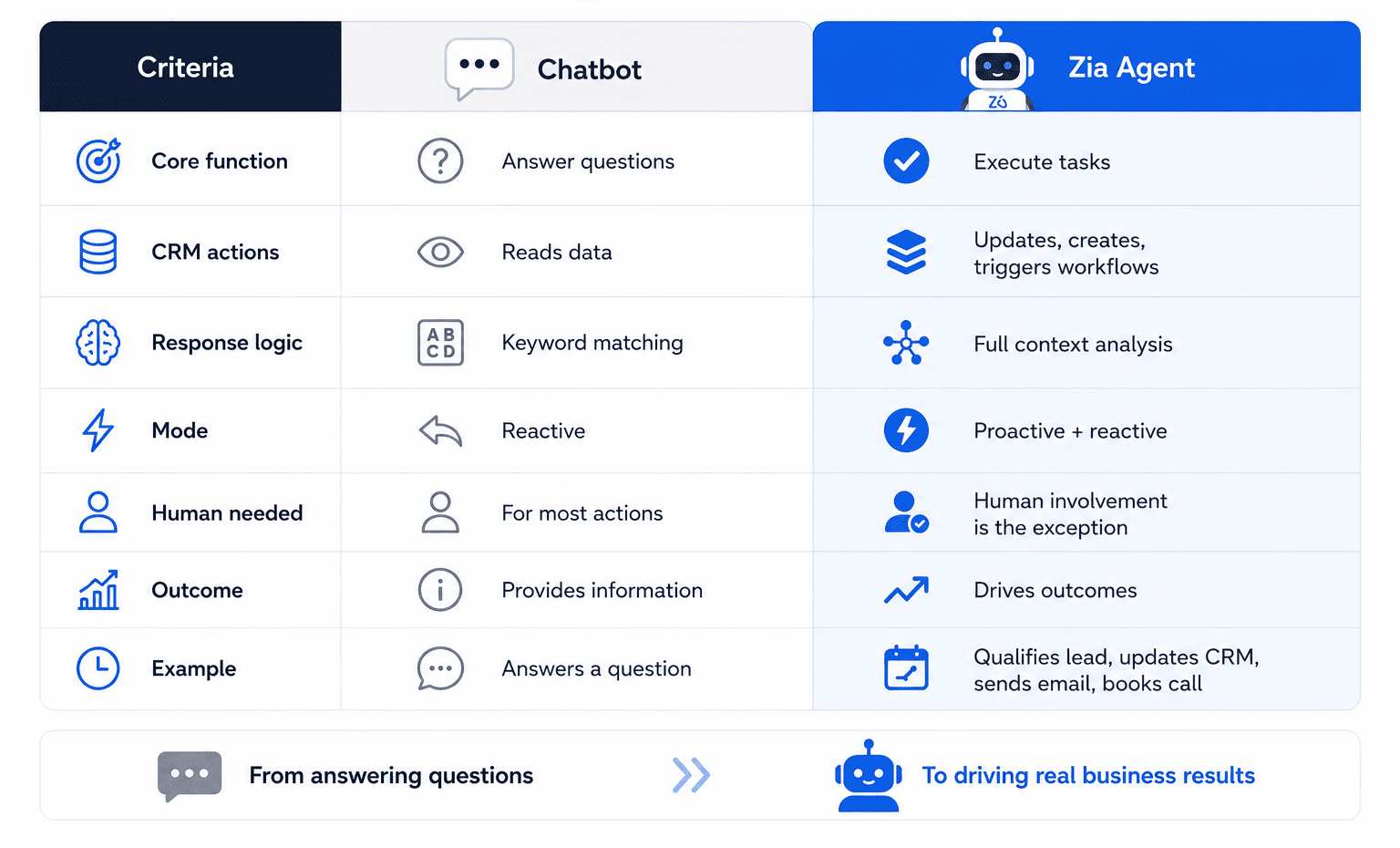
A few years ago, AI in CRM meant chatbots and simple automation. In 2026, businesses use AI agents as digital employees that can analyze data, automate workflows, qualify leads, send emails, and update CRM records without constant human input.
This is called agentic AI — the next generation of AI automation.
With Zia Agents, Zoho CRM allows companies to build AI employees inside their CRM using a no-code approach. These AI agents can handle routine tasks, support sales teams, and automate business processes 24/7.
Instead of just using AI tools, companies in 2026 are building AI-powered digital workforces.
Zia Agents vs Chatbots: What Makes AI Agents Different in Zoho CRM
4 Building Blocks of an AI Agent in Zoho CRM
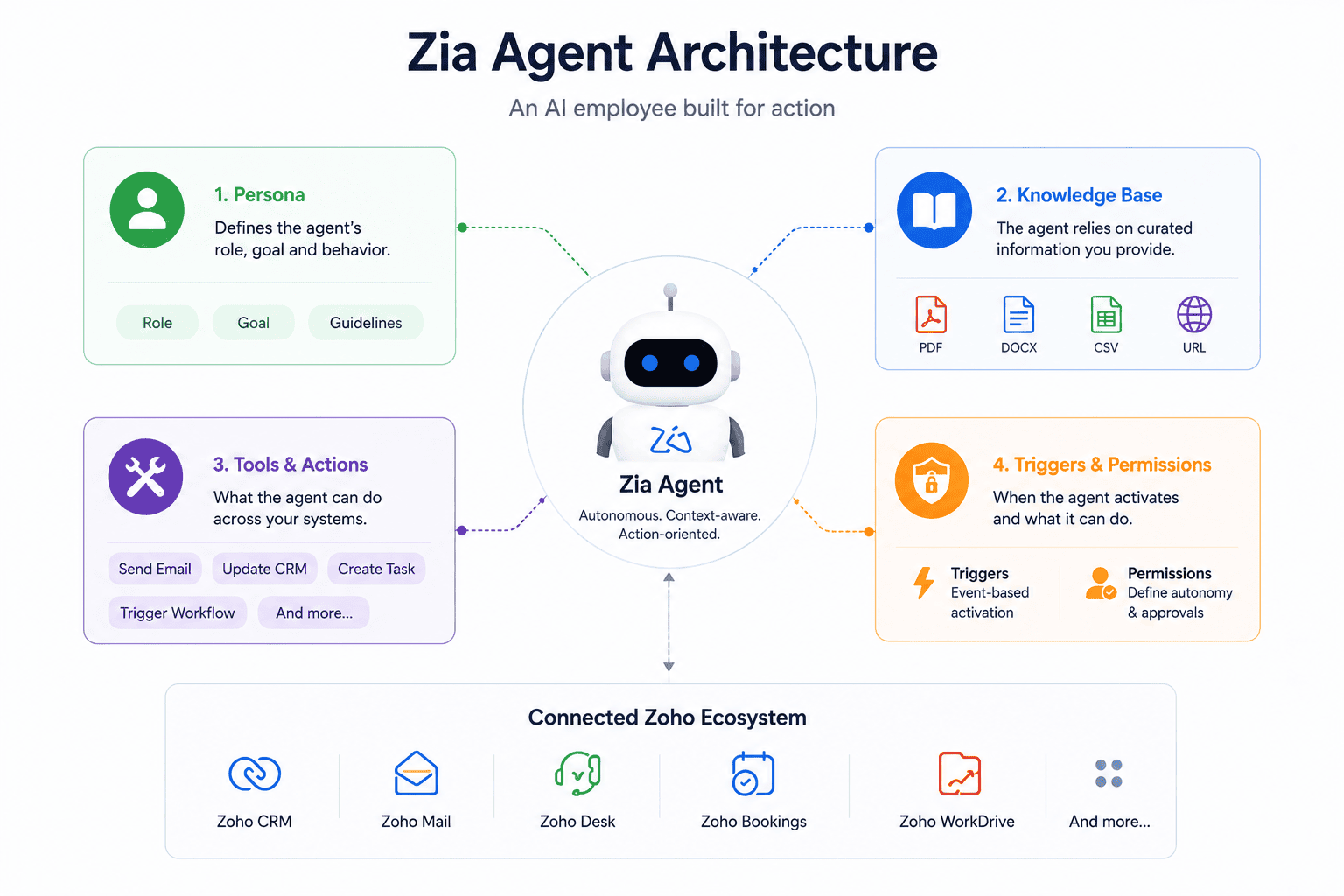
Every AI agent in Zia Agents is built on four essential components that power AI automation inside Zoho CRM. Together, they transform a simple chatbot into a fully functional digital employee capable of handling sales, support, and business workflows autonomously.
1. Persona
The Persona defines the AI agent’s role, behavior, and business goals. Whether you build an AI SDR, support assistant, or CRM automation agent, clear instructions improve decision-making, response quality, and workflow accuracy.
2. Knowledge Base
The Knowledge Base gives the AI agent access to company data, FAQs, SOPs, pricing, onboarding materials, and internal documentation. Zia Agents can use PDFs, DOCX files, CSVs, and URLs to deliver context-aware AI responses and smarter business automation.
3. Tools & Actions
This layer controls what the AI employee can actually do inside Zoho CRM. Zia Agents can send emails, update CRM records, create tasks, trigger workflows, schedule meetings, and automate repetitive business processes across the Zoho ecosystem.
4. Triggers & Permissions
Triggers determine when the AI agent activates, while permissions control what actions can run automatically and what still requires human approval. This helps companies scale AI workflow automation securely and maintain full operational control.
Step by Step: Your First AI SDR in a Few Hours
1. Open Agent Studio
In Zoho CRM, navigate to Setup → Zia → Agent Studio → Create Agent. Choose a prebuilt Sales Agent template or create a Custom AI Agent for advanced workflow automation and personalized business logic.
2. Define the AI Agent Role
Write a clear system prompt that explains the AI agent’s responsibilities, decision rules, and boundaries.
Example:
“You are Alex, an AI SDR agent. Qualify inbound leads based on our ICP: B2B companies, 10–500 employees, confirmed CRM budget. If qualified, offer available meeting slots and update the CRM lead status. If unqualified, politely decline and share a helpful resource. Never discuss pricing negotiations or contract terms.”
Well-structured prompts improve AI accuracy, lead qualification, and CRM automation performance.
3. Create the Knowledge Base
Upload sales materials, product documentation, FAQs, pricing details, ICP definitions, and objection-handling guides. Zia Agents can use PDFs, DOCX, CSVs, and URLs to power context-aware AI responses.
Start with a focused knowledge base to improve response consistency and reduce AI hallucinations.
4. Configure AI Actions
Connect the AI agent to core CRM workflows:
Lead status updates
Email automation via Zoho Mail
Meeting scheduling through Zoho Bookings
Task creation for SDR teams
Workflow triggers inside the Zoho ecosystem
This transforms the AI assistant into a fully operational digital employee.
5. Set Automation Triggers
Define when the AI agent should activate. Example:
Trigger: New Lead Created
The AI sales agent automatically starts lead qualification as soon as a new CRM lead enters the pipeline.
6. Test Before Deployment
Use the built-in Playground to simulate real sales conversations and validate AI behavior before launch. Run multiple lead qualification scenarios, then start with a limited rollout before scaling automation company-wide.
Ready to Launch Zia Agents in Your Business?
Real AI Agent Use Cases in Zoho CRM
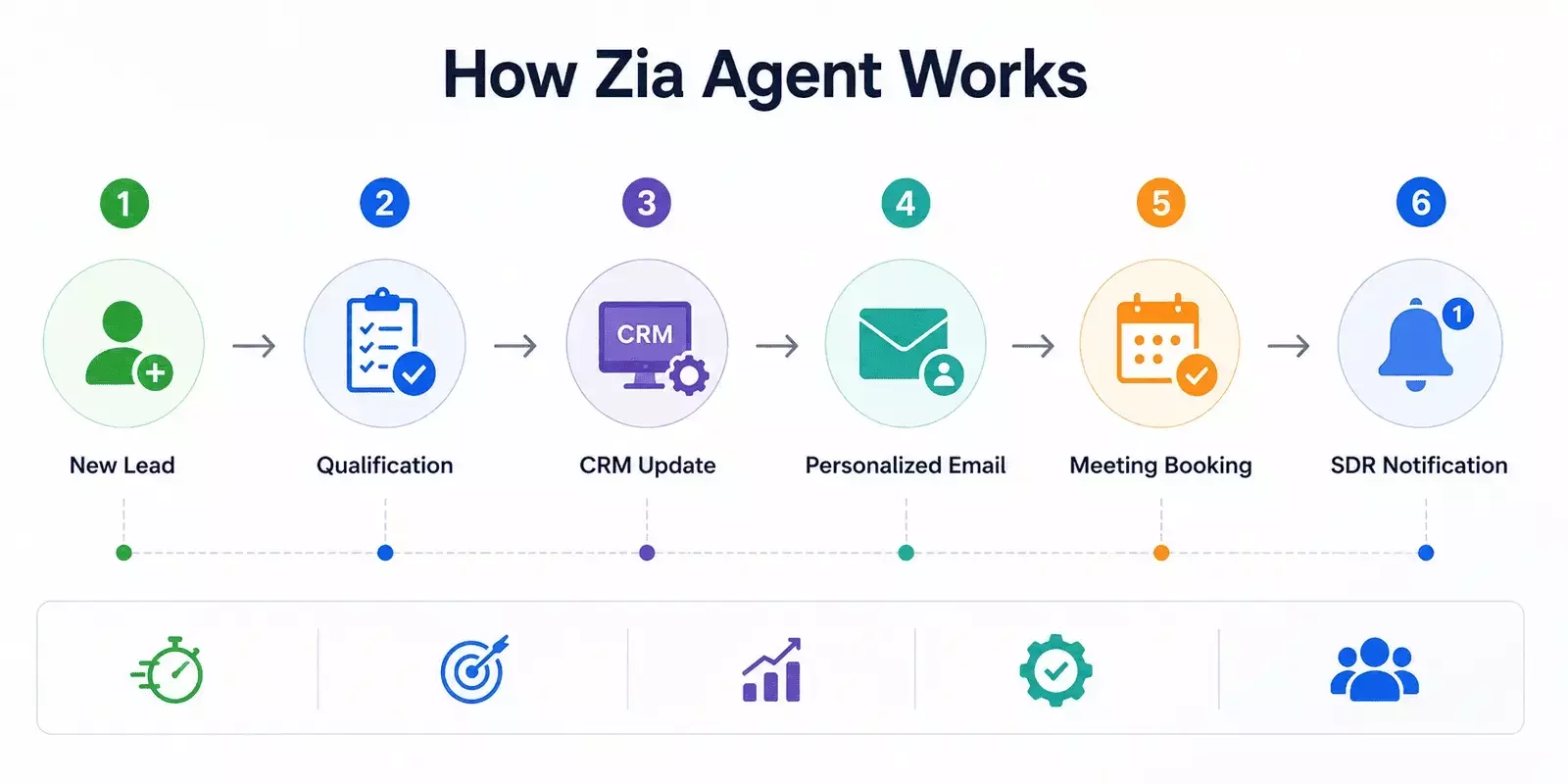
Businesses use Zia Agents inside Zoho CRM to automate sales, support, onboarding, and internal operations with AI-powered digital employees.
AI SDR Agent
Automates lead qualification, follow-ups, CRM updates, and meeting scheduling. AI sales agents can reduce response time from hours to minutes and improve sales automation efficiency across the pipeline.
AI Support Agent
Handles repetitive customer support requests 24/7, resolves common tickets autonomously, and escalates complex issues with full conversation context. This reduces support workload and improves customer experience.
AI Onboarding Assistant
Guides new customers through onboarding workflows, answers product questions, tracks progress, and alerts Customer Success Managers when users need human assistance.
AI Operations Assistant
Acts as an internal AI knowledge base for teams. Employees can instantly access SOPs, process documentation, and company guidelines without relying on managers or manual searches.
Enterprise-Grade AI Security and Data Protection
Security and compliance remain critical when implementing AI agents inside CRM systems and business workflows.
With Zoho CRM and Zia Agents:
Customer data is not sold to third parties
AI models are not trained on your business data without explicit consent
Every AI agent action is logged for transparency and auditability
EU data residency supports GDPR compliance requirements
Sensitive actions can require human approval before execution
This allows businesses to scale AI-powered CRM automation while maintaining security, operational control, and compliance standards.
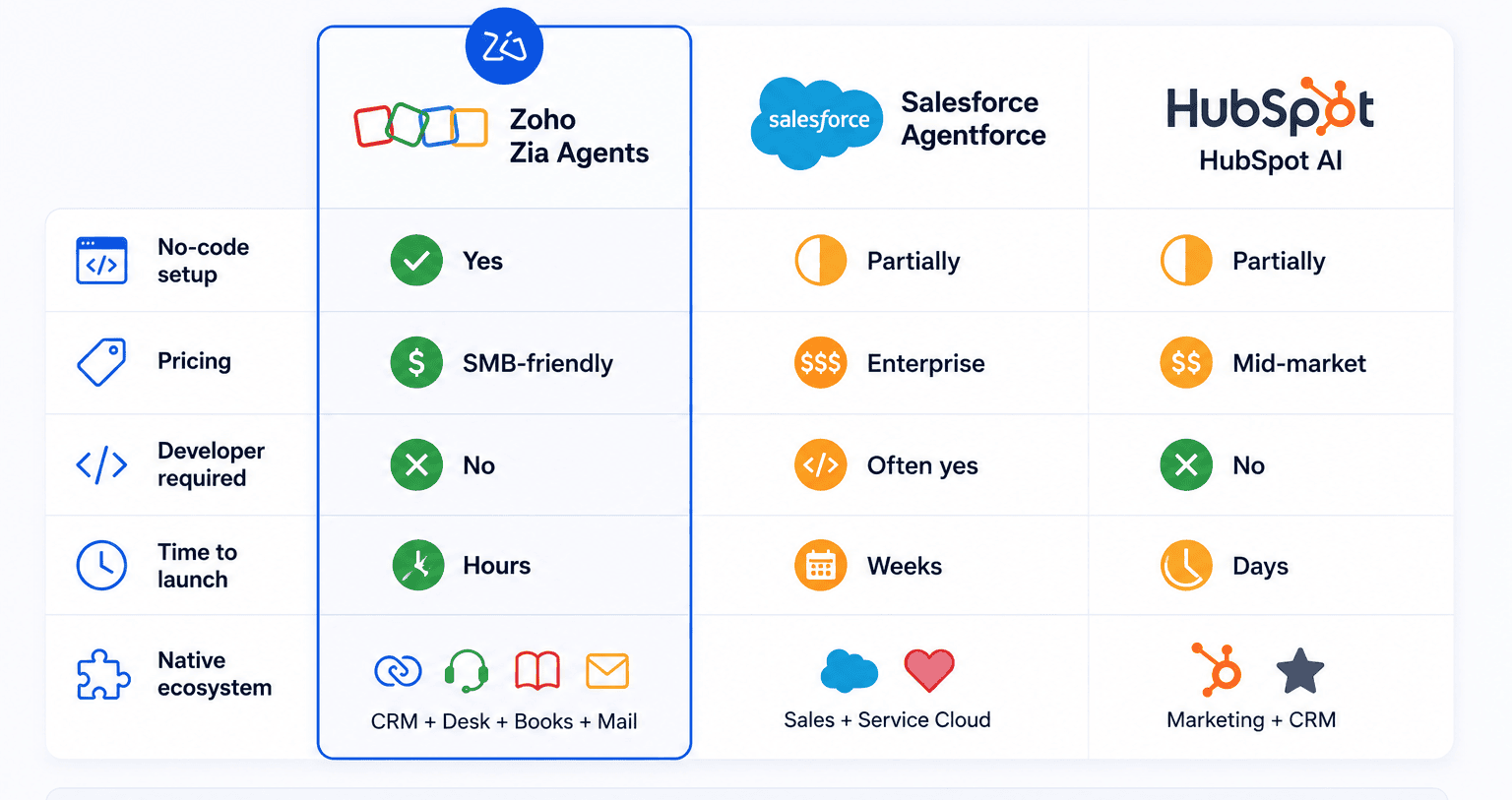
Zoho Zia Agents vs Agentforce vs HubSpot AI:
What’s the Difference?
From CRM Automation to AI Employees
AI agents are quickly becoming a practical part of modern CRM systems — not just another automation trend. Businesses already use AI employees to qualify leads, automate support, schedule meetings, update CRM records, and reduce repetitive manual work across sales and operations.
With Zia Agents, companies can launch AI-powered workflows directly inside Zoho CRM without building complex infrastructure or hiring large development teams. For SMBs, this makes enterprise-level AI automation more accessible, faster to deploy, and easier to scale.
At CRMOZ, we help businesses implement Zia Agents and AI automation inside the Zoho ecosystem — from process audit and workflow design to AI setup, integrations, testing, and production launch.
Want AI Employees Inside Your CRM?