How to Integrate Zoho CRM with Microsoft 365 and Google Workspace
Businesses rarely work inside a single application anymore. Sales teams manage leads in CRM, communicate through Gmail or Outlook, schedule meetings in Google Calendar or Outlook Calendar, and collaborate using Google Drive, Microsoft OneDrive, Teams, or Google Meet. Without proper integration, employees waste valuable time switching between applications, manually copying data, and searching for customer information.
Zoho CRM solves this challenge by connecting seamlessly with both Google Workspace and Microsoft 365. Whether your company relies on Gmail or Outlook, Google Meet or Microsoft Teams, Zoho CRM becomes the central place where customer relationships, communications, and business processes come together.
At CRMOZ, we've implemented Zoho CRM for organizations using both ecosystems. One common pattern appears in almost every project: companies already own excellent productivity tools—they simply need a CRM that connects everything into a single workflow.
✅ Good to know: You don't have to migrate from Google Workspace to Microsoft 365—or vice versa—to use Zoho CRM. It supports both platforms simultaneously.
Real-World Experience: How Integration Improves Daily Work
At CRMOZ, we've implemented Zoho CRM for companies using both Google Workspace and Microsoft 365 across industries including manufacturing, professional services, logistics, and retail.
One recent client relied on Gmail, Google Sheets, and shared calendars to manage sales. Customer conversations were scattered across inboxes, follow-ups depended on manual reminders, and managers had limited visibility into the sales pipeline. After implementing Zoho CRM with Google Workspace integration, emails were automatically linked to customer records, calendar events synchronized across teams, and sales activities became visible in real time.
Another customer using Microsoft 365 experienced similar improvements after connecting Outlook, Microsoft Teams, and OneDrive with Zoho CRM. Sales representatives no longer needed to switch between applications, while managers gained accurate reporting without manual data collection.
Need Help Integrating Zoho CRM?
Why You Need a CRM for Google Workspace and Microsoft 365
Google Workspace and Microsoft 365 are outstanding productivity suites, but neither was designed to manage a complete sales pipeline or customer lifecycle.
Many growing companies initially use spreadsheets, Gmail labels, Outlook folders, and shared contacts as a google workspace crm solution. While this works for a small team, it quickly becomes difficult to scale.
Without a dedicated CRM you may experience:
duplicate customer records
lost email conversations
inconsistent follow-ups
poor lead visibility
manual reporting
limited automation
A dedicated crm for google workspace centralizes customer information while allowing your team to continue working inside the applications they already know.
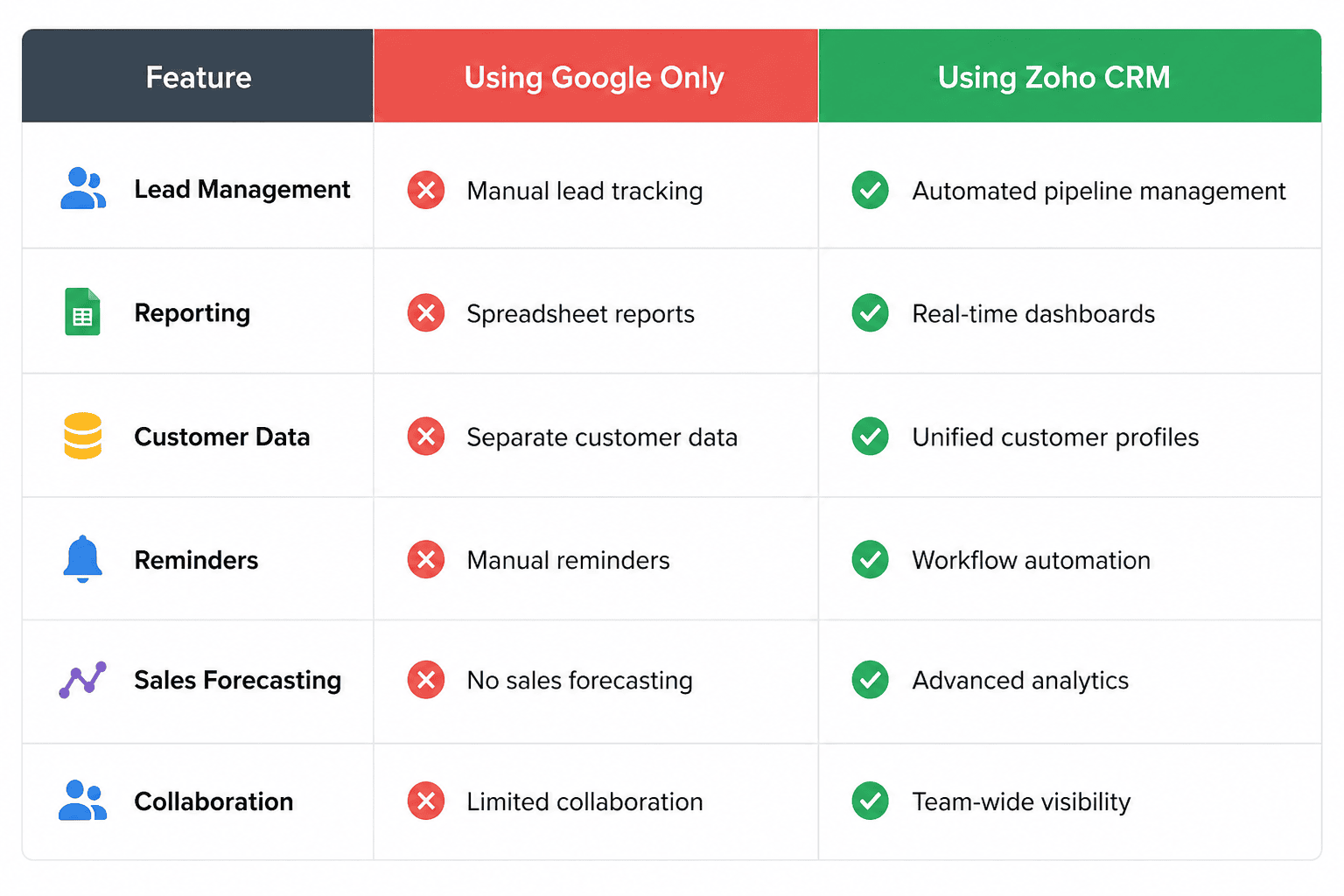
Why Using Google as CRM Is Not Enough for Growing Businesses
Many startups begin by using google as crm through Gmail, Google Sheets, Calendar, and Contacts.
Although this approach is inexpensive, it has significant limitations:
Google Workspace CRM vs Microsoft 365 CRM
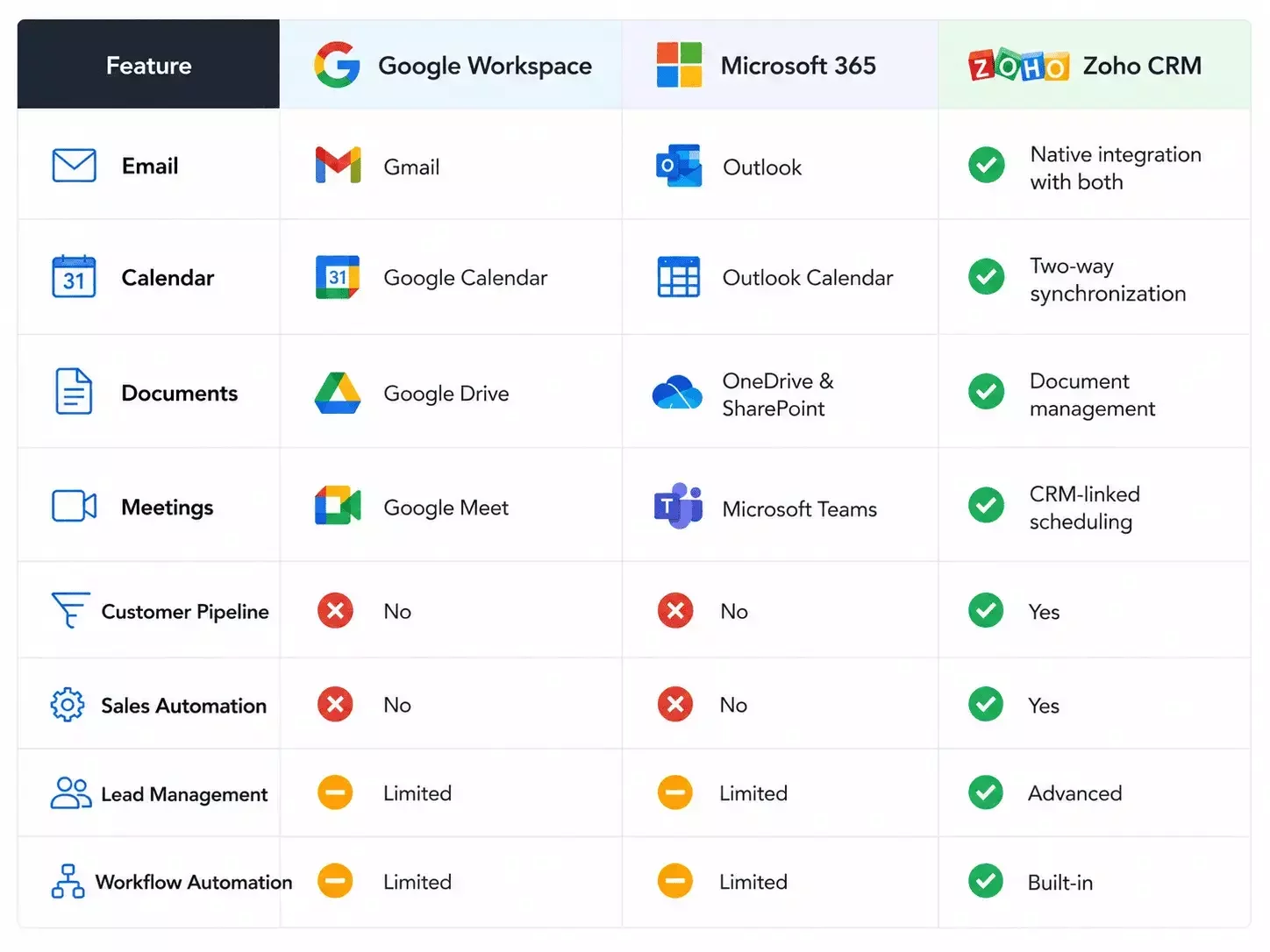
Unifying Communications Across Your CRM Workspace
Modern teams expect information to flow automatically.
Zoho CRM creates a connected crm workspace where emails, meetings, files, contacts, and tasks remain linked to each customer record.
Instead of searching through multiple applications, sales representatives can:
send emails directly from CRM
schedule meetings
access Google Drive files
view Outlook conversations
launch video meetings
automate follow-up workflows
This unified experience reduces administrative work and improves customer response times.
Native CRM Google Apps Integration in Zoho CRM
One of Zoho CRM's biggest advantages is its native crm google apps integration.
Rather than relying on third-party connectors for basic functionality, Zoho provides direct integrations with the services businesses use every day.
Supported Google Workspace features include:
Gmail email synchronization
Google Calendar sync
Google Contacts synchronization
Google Drive document management
Google Meet integration
Single sign-on (SSO)
Google Workspace user authentication
Because these integrations are maintained by Zoho, updates remain reliable and secure.
ℹ️ Integration tip: Before enabling synchronization, define which system should be the "source of truth" for contacts and calendars to avoid duplicate records.
Best Practices Before Connecting Zoho CRM
Successful integrations begin long before clicking the "Connect" button.
Before implementing Zoho CRM with Google Workspace or Microsoft 365, we recommend:
Clean duplicate contacts and outdated customer records.
Decide which platform will be the primary source of customer data.
Configure user permissions and security policies.
Test email synchronization with a small group of users.
Review automation rules before enabling workflows.
Train employees on the new integrated workflow.
These steps reduce implementation risks and ensure a smoother transition.
Key Benefits of Zoho as the Best Google CRM
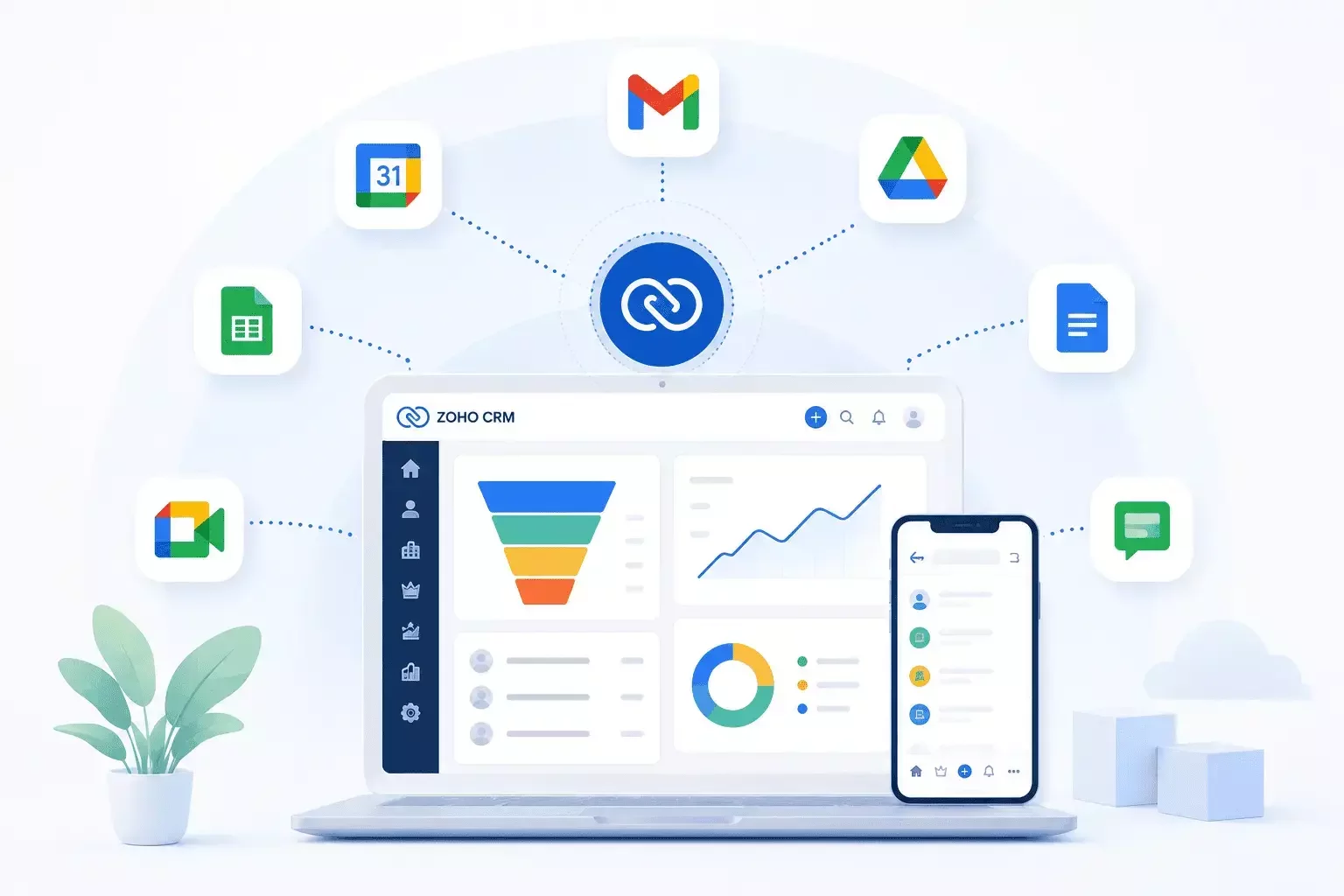
Many organizations searching for the best google crm want software that feels like a natural extension of Google Workspace.
Zoho CRM offers several advantages:
native Gmail integration
automatic lead capture from email
workflow automation
customizable sales pipelines
AI-powered sales assistance
advanced reporting
mobile applications
extensive API support
Instead of replacing Google Workspace, Zoho enhances it.
This makes Zoho one of the strongest options for companies looking for a modern google workspace crm.
Managing Email and Contacts with Google Apps CRM
Email remains the center of most customer communication.
With Zoho CRM acting as your google apps crm, every email conversation can automatically appear within the customer record.
Teams can also synchronize:
Google Contacts
Calendar events
Tasks
Documents
Meeting invitations
This eliminates duplicate data entry while keeping customer histories complete.
Running Your Business with CRM on Google Ecosystem
Businesses already invested in Google Workspace don't need to abandon their existing tools.
Instead, Zoho CRM functions as a powerful crm on google ecosystem by combining:
Gmail
Google Calendar
Google Drive
Google Meet
Google Contacts
Chrome extensions
Google authentication
The result is a connected workflow where customer data remains accessible without leaving the applications employees use every day.
Seamless Microsoft Office 365 CRM Integration
Zoho CRM provides reliable crm office 365 integration for organizations that depend on Outlook and Microsoft 365.
Supported Microsoft services include:
Outlook Email
Outlook Calendar
Microsoft Contacts
OneDrive
Microsoft Teams
Microsoft authentication
Outlook plugin
This office 365 crm integration helps employees avoid switching between multiple systems while keeping communications synchronized automatically.
Syncing Emails, Calendars, and Contacts
The Microsoft integration supports:
email synchronization
calendar sync
Outlook contacts
meeting scheduling
document access
cross-platform collaboration
user permissions management
Sales teams can continue using Outlook while customer information is automatically updated inside Zoho CRM.
⚠️ Best practice: Configure synchronization rules before importing historical data. Proper mapping prevents duplicate contacts and conflicting calendar events.
Common Integration Challenges
Most integration projects are straightforward, but several issues appear repeatedly during implementation.
Common challenges include:
duplicate contacts after synchronization
conflicting calendar events
incorrect email permissions
disconnected document storage
outdated customer information
inconsistent workflow automation
Working with an experienced Zoho Partner helps identify these issues before they affect business operations.
✅ Best Practice: A staged rollout with pilot users usually produces better adoption than enabling synchronization for the entire organization on day one.
Zoho Ecosystem Alternatives: Bigin by Zoho and Finance Tools
Not every company needs the full capabilities of Zoho CRM on day one.
Smaller businesses often begin with Bigin by Zoho, a lightweight CRM designed for startups, freelancers, and small sales teams.
Pipeline Management with Bigin by Zoho
Bigin by Zoho offers:
visual sales pipelines
contact management
email integration
simple workflow automation
mobile access
affordable pricing
As companies grow, they can migrate to Zoho CRM without rebuilding customer data or processes.
Managing Invoices with Zoho Books vs Google Accounting Software
Many businesses search for google accounting software, but Google Workspace does not include a dedicated accounting application.
Instead, organizations typically integrate accounting platforms with their CRM.
Zoho Books provides:
invoice creation
payment tracking
expense management
tax support
customer billing
finance automation
When connected with Zoho CRM, sales and finance teams share customer information automatically, reducing manual work and improving operational visibility.
Zoho Workplace: Another Productivity Ecosystem
Companies evaluating Google Workspace and Microsoft 365 should also consider Zoho Workplace. It includes business email, online office applications, document collaboration, meetings, team chat, file storage, and calendar management.
One advantage is that Zoho Workplace integrates natively with Zoho CRM, reducing the need for third-party connectors while providing a consistent user experience across the entire Zoho ecosystem.
Businesses don't necessarily need to replace Google Workspace or Microsoft 365. Many organizations use Zoho CRM alongside their existing productivity suite while gradually expanding into other Zoho applications as their business grows.
FAQ
Can Zoho CRM integrate with both Google Workspace and Microsoft 365?
Yes. Zoho CRM supports native integrations with both ecosystems, allowing businesses to synchronize emails, calendars, contacts, documents, and authentication.
Is Google Workspace a CRM?
No. Google Workspace is a productivity suite. It includes Gmail, Calendar, Drive, Meet, and Docs, but it does not provide full customer relationship management capabilities such as pipeline tracking, sales automation, or forecasting.
What is the difference between Zoho CRM and Bigin by Zoho?
Bigin by Zoho is designed for small businesses with simple sales processes, while Zoho CRM offers advanced automation, analytics, customization, AI features, and enterprise integrations.
Can Zoho CRM synchronize Outlook and Gmail?
Yes. Zoho CRM supports email synchronization with both Gmail and Outlook, allowing users to manage communications without leaving the CRM.
Does Zoho CRM work with Google Drive and OneDrive?
Yes. Zoho CRM integrates with Google Drive and Microsoft OneDrive for document management, making customer files accessible directly from CRM records.
Need Help Integrating Zoho CRM?
Connecting Zoho CRM with Microsoft 365 or Google Workspace is only part of a successful implementation. The real value comes from configuring synchronization to match your business processes, user roles, and data governance policies.
At CRMOZ, we help organizations plan, configure, and optimize Zoho CRM integrations to ensure clean data, reliable synchronization, and high user adoption. Whether you're implementing Zoho CRM for the first time or improving an existing setup, our certified consultants can help you build an integration that scales with your business.