Zoho Mail vs Outlook, Gmail & Exchange: Which Email Host is Best?
Gmail is part of Google Workspace, Outlook is an email client, and Exchange is Microsoft's email platform. Zoho Mail combines email hosting, calendars, and administration without ads. The best fit depends on your apps, security, storage, and total cost of ownership.
Is Zoho Mail a Worthy Microsoft 365 Alternative for Your Business?
For many small and midsize companies, yes. Zoho Mail supports a custom email domain, domain validation, aliases, groups, migration tools, mobile apps, and IMAP clients. It is particularly useful for businesses already using Zoho CRM, Books, or Desk.
Eligible plans add retention, eDiscovery, and S/MIME. Zoho lists encryption at rest and in transit, ISO/IEC 27001, and SOC 2 Type II. Confirm the exact plan and required compliance agreement before purchasing.
When evaluating a Zoho Mail alternative, businesses should compare not only subscription prices but also migration requirements, administrative controls, integrations, storage, and long-term ownership costs.
✅ Best fit: Zoho Mail is a practical Microsoft 365 alternative for secure, ad-free business email without a large desktop bundle.
Market Overview and Top Zoho Mail Competitors
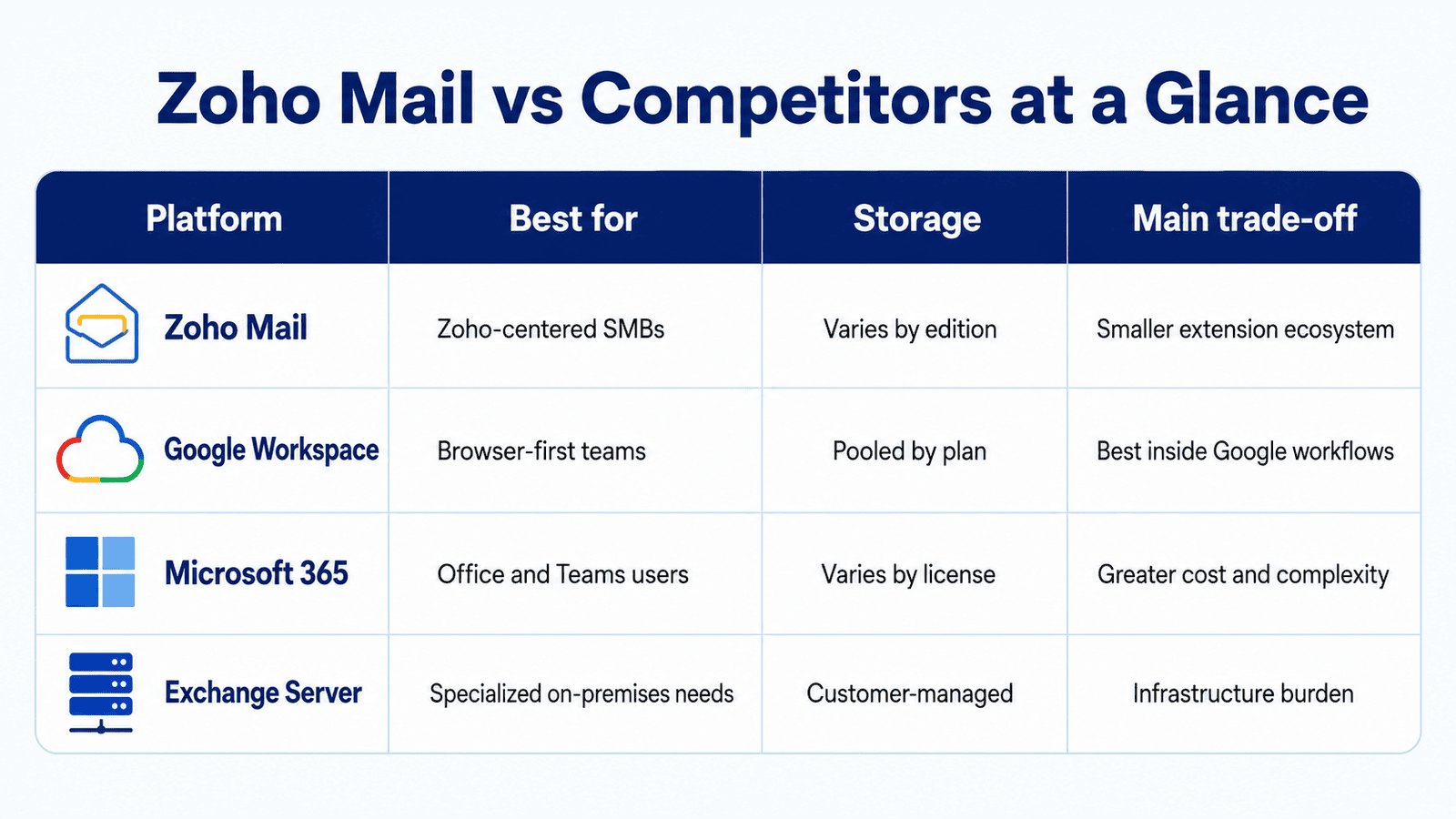
The leading Zoho Mail competitors include Google Workspace, Microsoft 365, Proton Mail, and Fastmail. Google Workspace focuses on browser-based collaboration, while Microsoft 365 combines Exchange Online with Outlook, Teams, and Office applications. Proton Mail prioritizes privacy, whereas Fastmail offers streamlined email and calendar tools without a complete productivity suite.
Real-World Ratings: What Zoho Mail Reviews Say
Verified Zoho Mail reviews commonly praise value, a clean inbox, domain management, and Zoho integrations. Reported drawbacks include an admin learning curve and varied support experiences. Reviews should guide a shortlist, not replace testing.
ℹ️ Pilot checklist: Test DNS, spam filtering, calendar sharing, mobile access, migration, and account recovery.
Direct Comparison: Zoho Mail vs Google Workspace
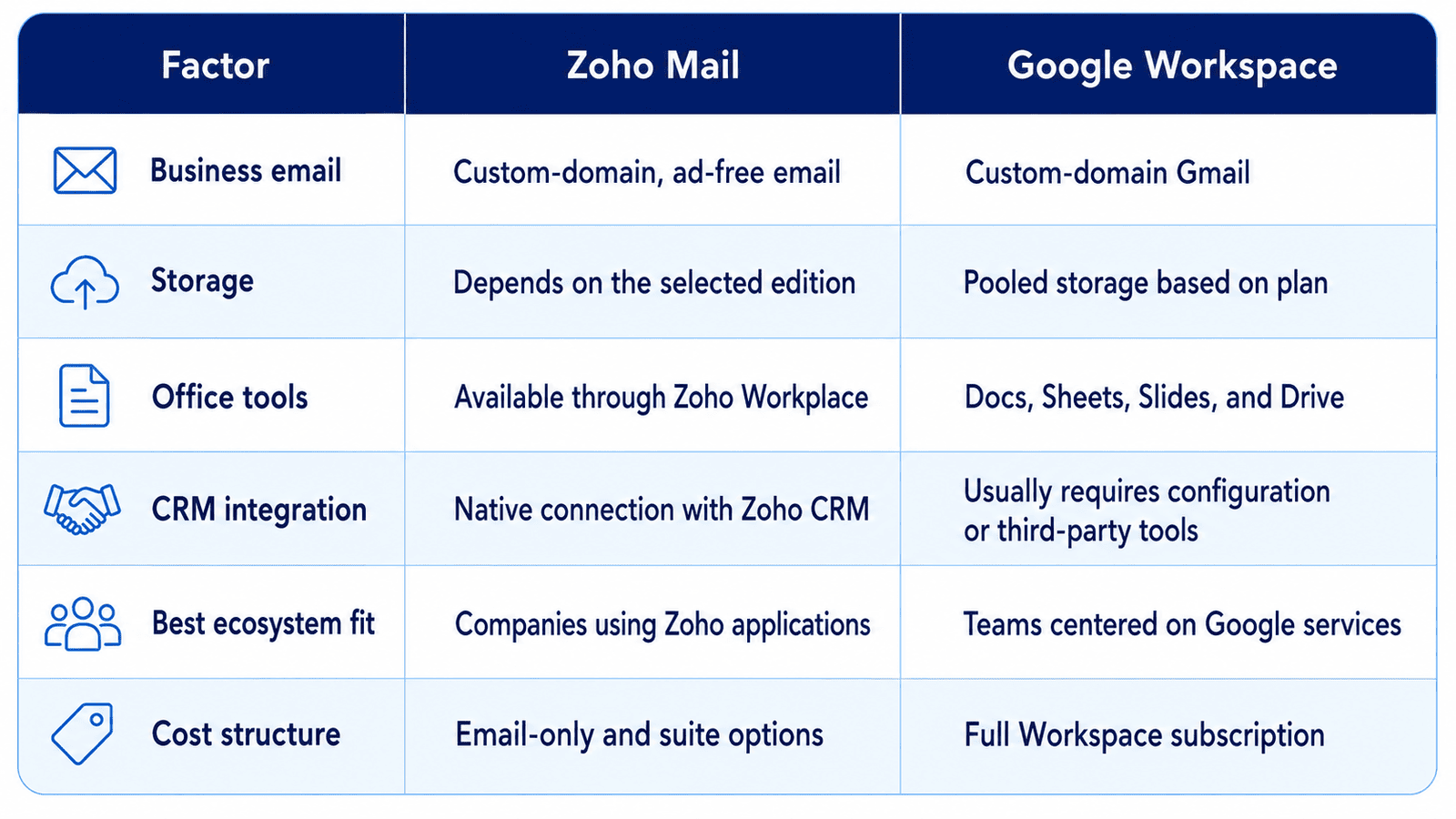
The Zoho Mail vs Gmail comparison is primarily about business priorities, while the broader Zoho Mail vs Google Workspace assessment also covers storage, productivity tools, administration, and collaboration.
Google Workspace is designed for teams that work extensively with Gmail, Google Drive, Docs, Sheets, Meet, and other Google services. Zoho Mail offers a more focused, ad-free email environment and connects closely with Zoho CRM, Books, Desk, Projects, and other business applications. Therefore, the right choice depends less on the inbox itself and more on the ecosystem employees use every day.
Pricing, Storage, and Ecosystem Integration
Google Workspace Business Starter currently includes 30 GB of pooled storage per user, shared across Gmail, Google Drive, and Google Photos. Higher plans provide more storage and advanced collaboration, security, and meeting capabilities.
Zoho Mail uses a different model. Storage capacity depends on the selected Mail or Zoho Workplace edition. Businesses can purchase email hosting separately or choose a broader productivity suite that includes tools for documents, spreadsheets, file storage, chat, and online meetings. Review the current Zoho Mail pricing plans before calculating costs.
From an integration perspective, Google Workspace is the stronger option for companies built around Drive, Docs, Sheets, Calendar, and Meet. Zoho Mail is often more practical for organizations already using Zoho CRM or other Zoho applications. For example, employees can associate messages with CRM records, access customer information, collaborate internally, and move between business tools without maintaining separate platforms.
ℹ️ Cost consideration: Compare the total cost of ownership rather than the mailbox price alone. Include migration, additional storage, third-party integrations, employee training, and any applications that may become unnecessary after the move.
Why Small Businesses Choose Zoho Mail as a Gmail Alternative
Small businesses often choose Zoho Mail as a Gmail alternative because it provides professional email hosting without requiring them to purchase a larger Google-centered environment. A company can create addresses on its custom domain, manage users and groups, configure security policies, and migrate existing mailboxes from one administrative console.
Zoho Mail may be especially suitable in the following situations:
The company already uses Zoho CRM. Email communication can become part of a connected sales and customer-management workflow.
Employees need a distraction-free inbox. Zoho Mail does not use advertising to support its business email experience.
The business wants flexible licensing. It can select focused email hosting or expand to the complete Zoho Workplace productivity suite.
Data privacy is a major consideration. Zoho publishes encryption, access-control, auditing, and compliance capabilities, although availability varies by plan.
The team wants fewer separate vendors. Mail, CRM, accounting, support, projects, and collaboration tools can operate within the broader Zoho ecosystem.
In a Gmail vs Zoho Mail decision, Gmail remains attractive for teams that collaborate continuously in Google Docs, Sheets, Drive, and Meet. Zoho Mail can deliver better operational value when email must connect with sales, finance, support, and other Zoho-managed processes.
✅ Recommendation: Run a pilot with several real users before migrating the entire company. Test email delivery, shared calendars, mobile access, spam filtering, administrator recovery, and integrations with the applications employees use every day.
Ready to Implement Zoho Mail for Your Business?
As an official Zoho Partner, CRMOZ can set up Zoho Mail, configure your business domain and security settings, migrate existing emails, and ensure a smooth transition without disrupting daily communication.
Enterprise Comparison: Zoho Mail vs Outlook & Microsoft Exchange
A Zoho Mail vs Outlook comparison requires an important clarification. Outlook is primarily an email and calendar client, while Microsoft Exchange is the platform responsible for hosting mailboxes, synchronizing messages, applying organizational policies, and managing business email infrastructure.
Within Microsoft 365, Outlook normally works with Exchange Online. Companies can also operate Exchange Server on their own infrastructure or use a hybrid configuration that connects local servers with Microsoft cloud services. Zoho Mail follows a cloud-first model and includes its own web, mobile, and desktop experience.
Microsoft is generally stronger for enterprises already dependent on Windows, Microsoft Entra ID, Teams, SharePoint, Office applications, and advanced Microsoft compliance tools. Zoho Mail can be a more manageable Exchange alternative for businesses that want professional cloud email without maintaining a complex Microsoft environment.
On-Premises and Cloud Hosting: Looking for a Modern Exchange Alternative
Traditional Exchange Server gives an organization direct control over its email infrastructure. Administrators can manage servers, storage, databases, authentication, backup processes, and network access according to internal requirements. This control may be important for businesses with legacy systems, specialized integrations, or strict infrastructure policies.
However, an on-premises Exchange environment also requires:
Server hardware or private virtual infrastructure.
Installation, configuration, and regular security updates.
Backup, disaster recovery, and storage management.
Continuous monitoring and qualified technical staff.
Capacity planning as the number and size of mailboxes increase.
Protection against downtime, hardware failure, and cyberattacks.
Zoho Mail removes much of this infrastructure burden. Mailboxes are hosted in the cloud, while Zoho manages platform maintenance, service updates, and underlying availability. Administrators still control users, domains, groups, routing, security policies, and email retention from a centralized console.
Exchange Online provides similar cloud advantages and remains closely connected to Outlook and Microsoft 365. Therefore, the choice between Zoho Mail vs Microsoft Exchange is often an ecosystem decision rather than a simple hosting comparison.
ℹ️ Cost consideration: The subscription price does not represent the complete cost of an on-premises email platform. Hardware, backup storage, administration, monitoring, security tools, software updates, and recovery planning should be included in the total cost of ownership.
Admin Controls, Security Protocols, and Offline Access
Both Zoho Mail and Microsoft Exchange provide centralized administration, but their capabilities are organized around different ecosystems. Zoho Mail administrators can manage domains, users, aliases, groups, email policies, routing rules, mailbox access, and migration from a web-based control panel.
Depending on the selected edition, Zoho Mail also provides retention policies, eDiscovery, audit logs, mobile access controls, S/MIME, and other enterprise features. Published security measures include encryption at rest and in transit, TLS, multi-factor authentication, spam protection, and malware detection.
Microsoft Exchange offers extensive administrative and compliance capabilities, especially when combined with Microsoft 365, Microsoft Entra ID, Microsoft Purview, and Defender. This can provide an advantage for large enterprises that require detailed identity policies, legal discovery, data-loss prevention, advanced threat protection, or hybrid infrastructure management.
⚠️ Compliance warning: The availability of retention, eDiscovery, archiving, encryption, and data-loss prevention depends on the provider and license. Businesses should verify exact plan specifications instead of assuming every security feature is included by default.
Offline access is available in both environments, although the user experience differs. Outlook provides mature offline mailbox synchronization when used with Exchange. Zoho Mail can be accessed through its Trident desktop application or compatible IMAP clients, subject to plan support and configuration. Users can work with previously synchronized messages while disconnected and send queued messages after internet access is restored.
A business should choose Zoho Mail when it values simpler cloud administration, integration with Zoho applications, and reduced infrastructure overhead. Microsoft Exchange remains a stronger option when Outlook, Windows identity, Microsoft compliance services, and hybrid infrastructure are essential.
✅ Migration recommendation: Before replacing Exchange, audit shared mailboxes, public folders, archives, distribution groups, delegated permissions, transport rules, calendars, retention policies, and third-party integrations. A migration tool can transfer email data, but it may not automatically reproduce every business rule or access configuration.
Final Verdict: Which Business Email Provider Should You Choose?
Choose Zoho Mail for secure email, Zoho integration, and leaner licensing. Choose Google Workspace for Google-native collaboration. Choose Microsoft 365 when Outlook, Office, Teams, and enterprise identity are central.
Run a pilot. Measure delivery, administration time, adoption, and support, then calculate three-year ownership cost.
FAQ
Why consider Zoho Mail instead of Microsoft 365 or Google Workspace?
It may reduce licensing complexity while retaining professional email, domain controls, calendars, migration support, and security. Savings depend on the required plan.
What do Zoho Mail reviews say about uptime and support?
Users often praise reliability and value, while support experiences vary. Check current service terms and test support during a pilot.
How does Zoho Mail vs Microsoft Exchange compare for hybrid workforces?
Both support distributed teams. Zoho suits cloud-first businesses seeking simpler management; Exchange is stronger where Outlook, Microsoft identity, compliance tooling, or hybrid infrastructure is already embedded.
Ready to Implement Zoho Mail for Your Business?
As an official Zoho Partner, CRMOZ can set up Zoho Mail, configure your business domain and security settings, migrate existing emails, and ensure a smooth transition without disrupting daily communication.