Which BI Tool Is Better for Your Business?
In 2026, businesses relying on gut feeling and scattered spreadsheets are losing ground to competitors making decisions backed by real-time data. That's why Zoho Analytics vs Power BI has become one of the most-searched BI comparisons among business owners, operations managers, and IT decision-makers.
Zoho Analytics is a cloud-based, self-service BI platform built for fast deployment and deep integration with apps like Zoho CRM and Zoho Books. Microsoft Power BI is Microsoft's enterprise analytics platform, woven into Microsoft 365 and Azure. Neither is universally "better" — the right BI software comparison outcome depends on your size, budget, and existing systems. Here's how the two stack up.
Zoho Analytics
Zoho Analytics is a self-service business intelligence platform that lets non-technical users build dashboards without code. Highlights: drag-and-drop dashboard creation with dozens of chart types, data blending from multiple sources into one view, and AI-powered insights through Zia, which answers natural-language questions and auto-builds dashboards. Native Zoho ecosystem integration gives instant access to Zoho CRM, Books, Desk, and Projects data.
It's especially popular with small and mid-sized businesses, sales teams, and companies already running Zoho CRM, where dashboards that take weeks elsewhere can deploy in days.
Microsoft Power BI
Power BI is Microsoft's flagship BI platform, built for advanced data modeling and large-scale reporting. It includes Power BI Desktop (free authoring), DAX-based modeling for complex calculations, enterprise reporting via Microsoft Fabric, and deep integration with Excel, SharePoint, Azure, and Dynamics 365.
It's the default for larger organizations and enterprise IT teams already standardized on Microsoft 365 or Azure, rewarding technical investment with strong scalability.
Feature-by-Feature Comparison
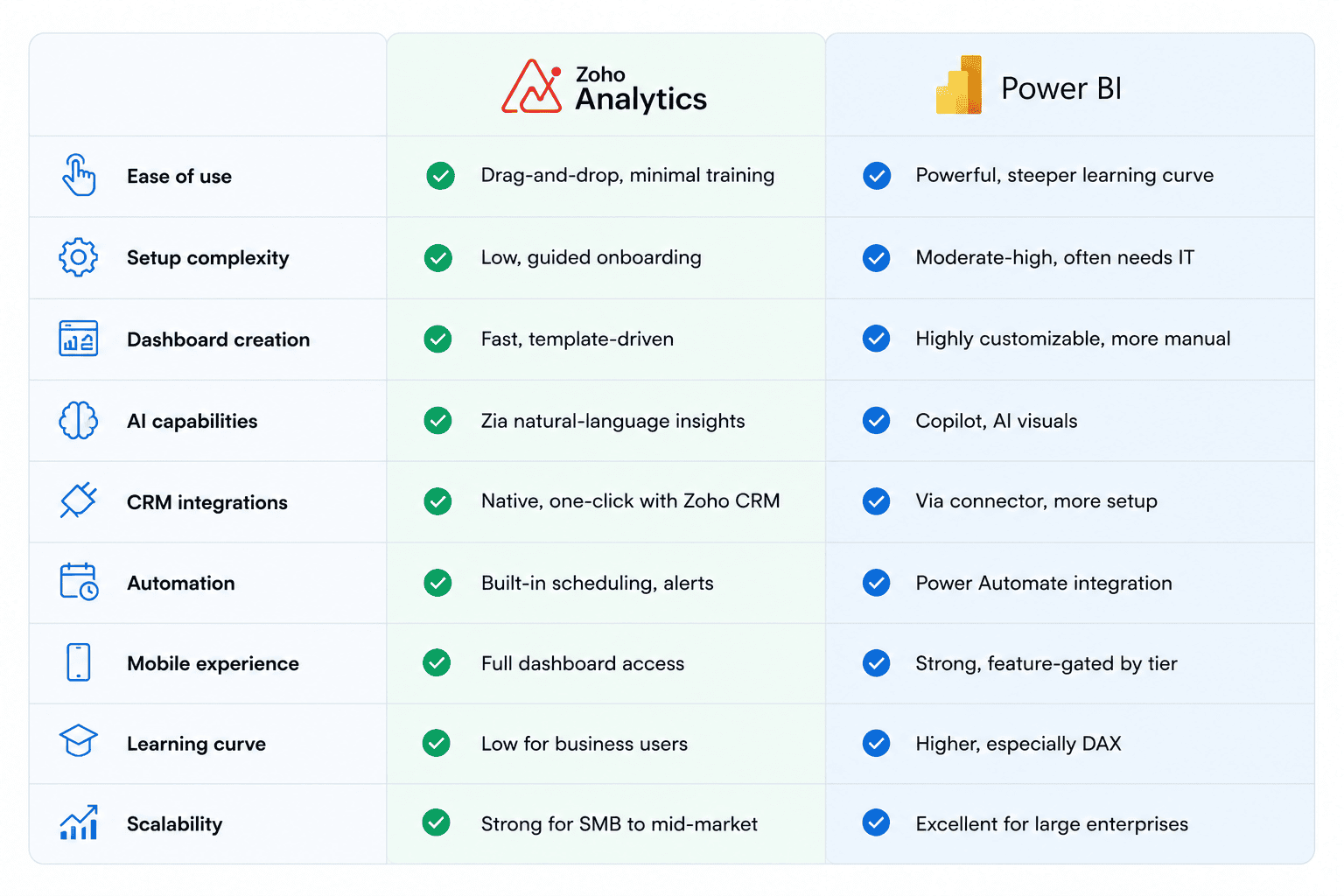
Ease of Implementation
Zoho Analytics typically deploys faster — many businesses have a working dashboard within days — with minimal technical requirements and quick time-to-value for existing Zoho users.
Power BI usually needs more technical setup, often involving DAX work and dedicated BI/IT expertise, making implementation longer for enterprise-wide rollouts.
Reporting and Dashboard Capabilities
Both support interactive dashboards and KPI tracking but differ in focus. Zoho Analytics excels at sales reporting dashboards by pulling Zoho CRM data natively — a strong fit for CRM reporting tools. Power BI's modeling depth suits complex, multi-source executive and financial reporting at scale. Both connect to major marketing platforms, though Zoho's AI insights help non-analysts spot trends without manual digging.
Integration Ecosystem
Zoho Analytics offers native, prebuilt dashboards for Zoho CRM, Books, Desk, and Projects — cutting weeks of setup for Zoho users. Power BI offers deeper native ties to Microsoft Dynamics, Excel, SharePoint, and SQL databases. Both connect to Google Analytics and common ERP systems, though Zoho's connector library grows faster for SMB apps while Power BI's strength lies in enterprise data infrastructure.
Pricing Comparison
Exact pricing shifts often for both vendors, so focus on structure rather than numbers.
Zoho Analytics offers a lower entry cost, simple per-user pricing, and strong value for SMBs needing full BI functionality without enterprise overhead.
Power BI uses tiered licensing (Pro, Premium Per User, Fabric capacity), and the right tier depends on how many people create versus simply view reports. Some Microsoft 365 plans cover part of the cost, but capacity-based licensing needs careful planning to avoid overpaying as you scale.
Want to see what Zoho Analytics can do for your business?
Zoho Analytics vs Power BI: Pros and Cons
Zoho Analytics
Pros
Significantly cheaper than Power BI for most tiers, with a genuinely usable free plan (2 users, 10,000 rows) that's good for micro-businesses and solo founders
Gentler learning curve — drag-and-drop report building without needing a query language
Seamless native integration with other Zoho apps (CRM, Books, Desk, Campaigns) if you're already in that ecosystem
Supports 500+ data connectors across databases, warehouses, and business apps + Built-in AI assistant ("Zia") for natural-language querying of data
Transparent, predictable pricing with no extra charges for sharing or embedding
Self-service BI platform that scales reasonably from SMB to larger teams
Cons
Power BI has practical limitations Zoho doesn't always avoid either — but more relevantly, Zoho can face performance issues with large datasets and has a learning curve for advanced features
Scaling can require purchasing additional licenses or upgrading tiers
Some users find the structure of reports vs. dashboards vs. individual graphs confusing
Weaker fit if your organization is deeply invested in the Microsoft stack (Azure, SharePoint, Dynamics 365)
Power BI
Pros
Vast library of data connectors pulling from hundreds of sources — Azure SQL, SharePoint, Dynamics 365, Excel, and more
Deep, tight integration with Microsoft 365 and the broader Microsoft ecosystem
Easy-to-use dashboards, rapid deployment, and a clean UI for common reporting tasks
More mature, enterprise-grade platform with stronger advanced analytics (DAX, complex data modeling)
Massive user base and community — 4.4-star rating across 3,231 reviews, lots of third-party training material
Better suited for large-scale, complex enterprise data environments
Backed by Microsoft Fabric for organizations wanting unified data/analytics infrastructure
Cons
Recent pricing increases — Power BI Pro rose from $10 to $14/user/month, and Premium Per User from $20 to $24
Power BI Pro has practical limitations: a 1 GB dataset size cap, only 8 daily data refreshes, and limited sharing options — fixed by upgrading, but that pushes cost up significantly
Steeper learning curve, often requiring training or a dedicated analyst to use effectively, especially to unlock DAX-based modeling Chart customization is less rich than in Excel or Tableau, and multi-dataset modeling requires understanding relationships between tables
Some users report stability quirks (broken filters, visuals behaving inconsistently)
Confusing/complex licensing tiers (Pro vs. Premium vs. Premium Per User vs. Fabric capacity)
Which Tool Is Better for Different Business Types?

Small businesses generally do best with Zoho Analytics — fast setup and low cost make it a strong best BI tool for small business candidate.
Mid-sized companies face a real trade-off: Zoho Analytics suits teams without dedicated BI staff; Power BI suits those with in-house analytics expertise.
Enterprises often lean Power BI, especially with massive datasets and existing Microsoft Fabric or Azure investment.
Existing Zoho users see faster ROI from Zoho Analytics since their data is already connected. Existing Microsoft users often find Power BI a natural extension of familiar tools.
Already Using Zoho CRM? Get More Value with Zoho Analytics
Both platforms are powerful Business Intelligence tools — the right choice depends on your goals, not which is objectively "best." For most SMBs, especially existing Zoho users, Zoho Analytics delivers faster deployment, easier adoption, and lower cost. For enterprises deeply invested in Microsoft infrastructure, Power BI offers modeling depth worth the added complexity.
Your CRM already contains valuable business data. Zoho Analytics transforms that data into interactive dashboards, automated reports, and AI-powered insights—without the complexity of enterprise BI platforms.
As a Zoho implementation partner, CRMOZ helps businesses deploy Zoho Analytics faster, connect all critical data sources, and build dashboards that support smarter business decisions.