Google Ads CRM Integration: Optimize for Qualified Leads
A completed contact form starts a conversation. It does not tell you whether the person needs your service, has a realistic budget, or is ready to buy. When advertising reports stop at form submissions, marketing and sales can end up measuring two different versions of success.
Marketing sees more conversions and a lower cost per lead. Sales sees irrelevant inquiries, unreachable contacts, and prospects who will never become customers. A Google Ads CRM integration connects those perspectives by sending meaningful sales outcomes back to the advertising platform.
For businesses that generate inquiries online and close deals through a sales team, this feedback loop should be a core part of the advertising setup. Google Ads brings prospects in; the CRM records what happens next.
Why a cheap lead can be expensive
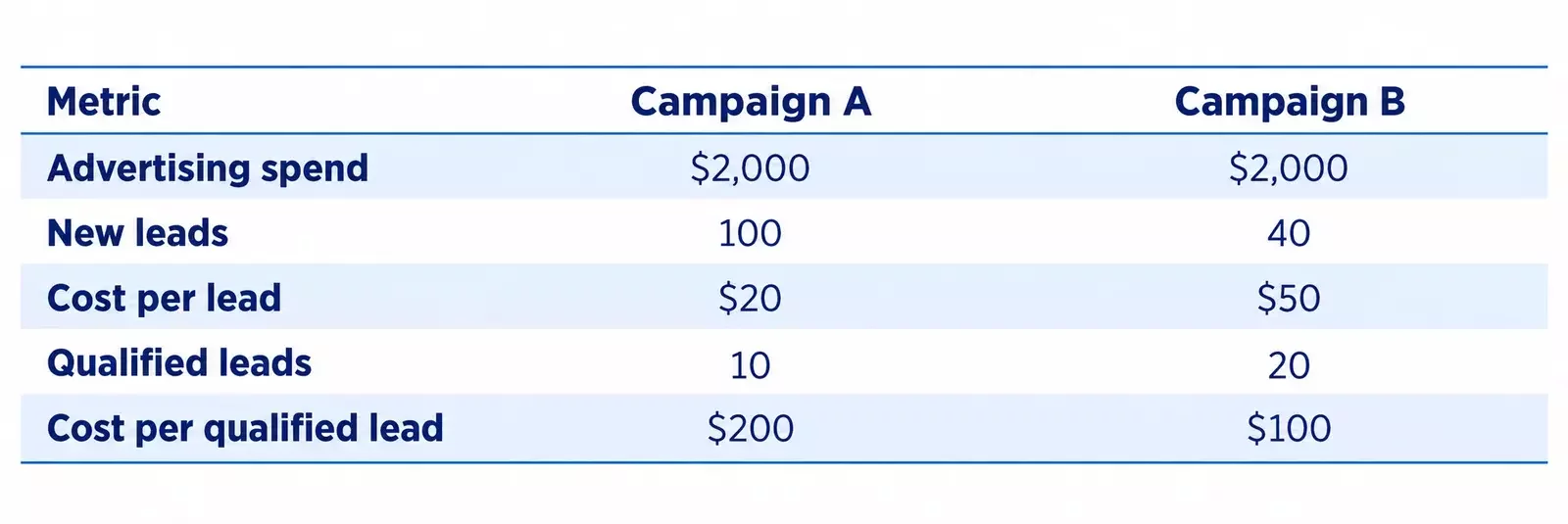
Consider this hypothetical example. Two campaigns spend the same amount, but their leads perform differently after sales qualification.
Campaign A looks stronger if the report ends at lead volume. Campaign B produces twice as many qualified prospects for the same spend. These illustrative numbers show why a low cost per lead can hide an expensive sales pipeline.
The business needs visibility into qualification and customer acquisition before deciding which campaign deserves more budget.
What the CRM should tell Google Ads
Start by agreeing on clear sales stages. A new lead has submitted an inquiry. A qualified lead meets your business criteria. A customer has reached your chosen purchase or closed-deal milestone. Google supports qualified-lead and converted-lead goals and recommends separate conversion actions for different funnel stages.
Define qualification in practical terms: a relevant service request, a supported location, an appropriate company profile, or a confirmed buying need. Use criteria your sales team can apply consistently. A salesperson’s personal impression is a weak foundation for campaign optimization.
Map these CRM milestones to Google Ads events. An unsuitable inquiry should not trigger the qualified-lead event. Simply recording a rejection in the CRM does not automatically send Google a negative training signal; the integration must transmit the intended positive milestones accurately.
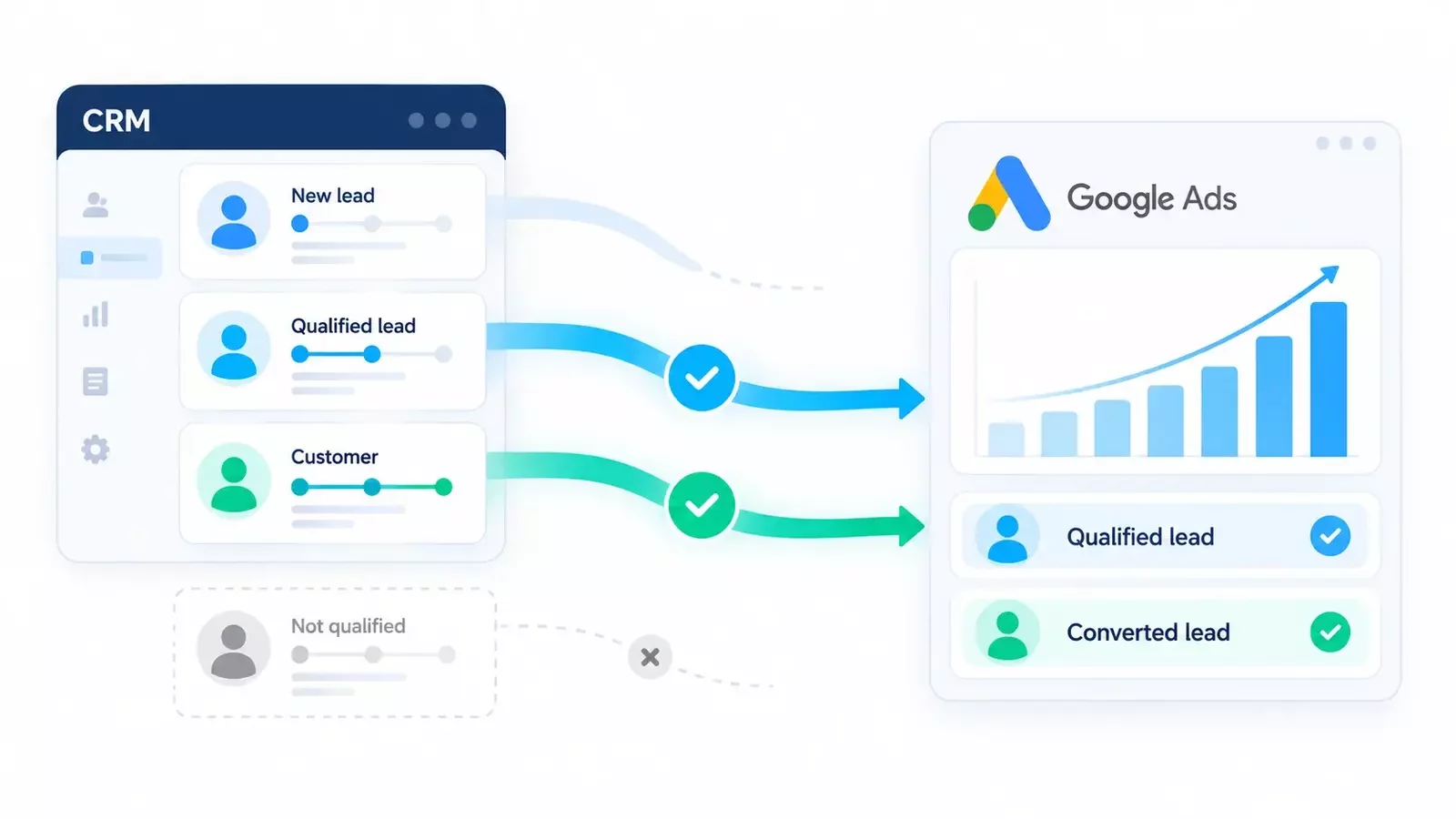
How the feedback loop works
A visitor clicks an ad, reaches your website, and submits an inquiry. The CRM stores the contact alongside available advertising identifiers. After the sales team confirms qualification, the integration uploads the corresponding conversion. A later customer milestone can be recorded separately.
Enhanced conversions for leads improves matching by using hashed first-party contact data, such as an email address, together with available click identifiers. The website and imported CRM events must be configured to provide compatible matching information. Google recommends including available GCLIDs in uploaded events.
UTM parameters remain useful for source reporting, but they are not a replacement for conversion matching. The implementation also needs accurate event timestamps, a consistent time zone, and protection against duplicate uploads.
Use supported import connections through Google Ads Data Manager or a suitable integration. For new custom development, check the Data Manager API: Google’s current documentation announces a migration of offline-conversion and enhanced-conversion uploads away from the Google Ads API.
From inquiries to qualified leads
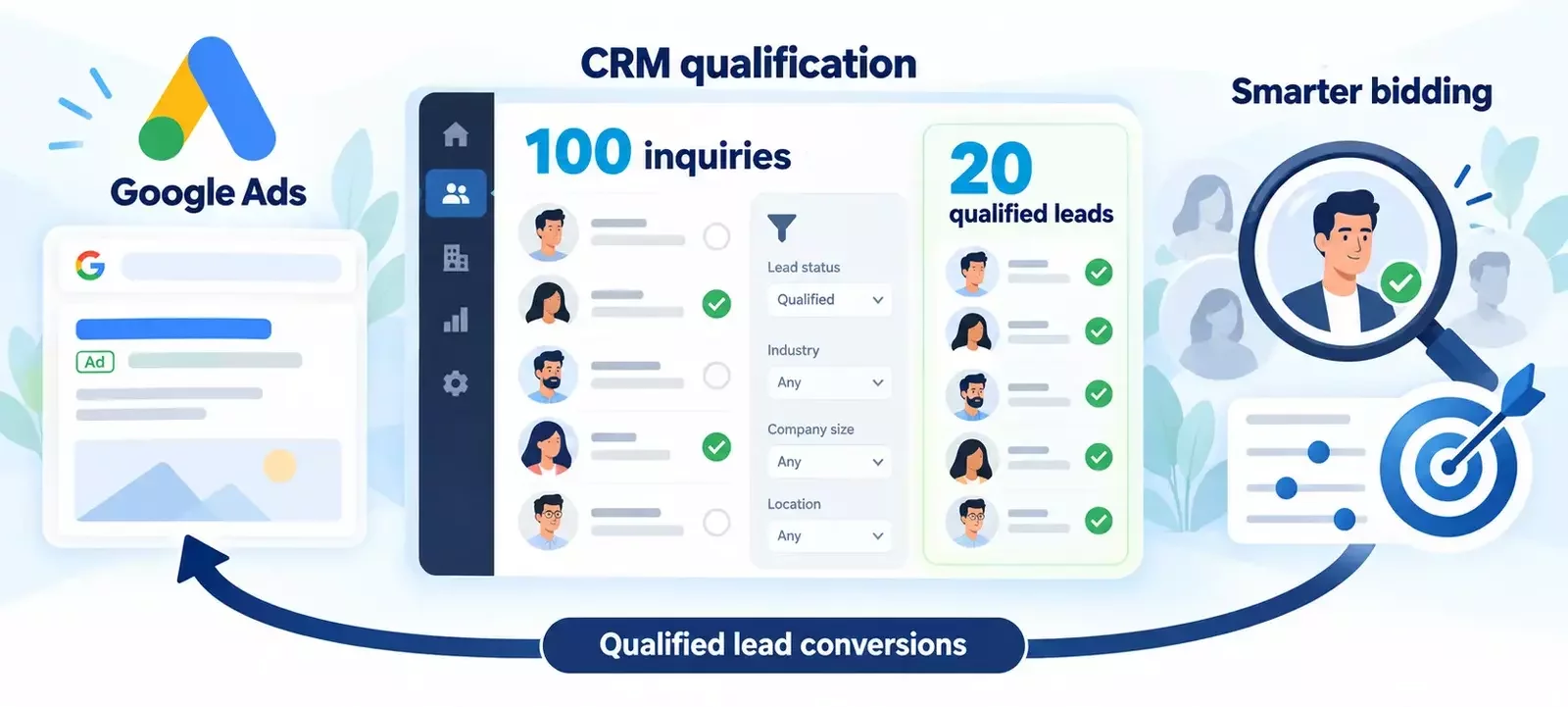
A Google Ads campaign generates 100 inquiries. Your sales team qualifies 20 in Zoho CRM, and the integration sends those events back to Google Ads. When qualified-lead conversions are included in the campaign’s bidding goals, Smart Bidding can use this feedback to optimize toward lead quality.
What Google learns - and what still needs human judgment
Smart Bidding can use imported offline conversions to inform automated bidding. Google recommends frequent, consistent uploads so the feedback stays current.This gives campaigns a signal closer to your chosen business outcome.
The system does not independently decide what a good customer means for your company. Your qualification rules, uploaded events, and campaign goals define that outcome. Better signals support better decisions, but they do not guarantee lower costs or more sales.
Keep reviewing search intent, landing pages, offers, and sales follow-up. Allow for the delay between an inquiry and qualification when comparing results. A campaign launched yesterday should not be judged against a fully matured sales cohort.
Where Zoho CRM fits
In a Zoho CRM implementation, the feedback workflow can be designed around qualification fields and deal milestones. Plan fields for attribution data, qualification timestamps, rejection reasons, and relevant deal values, then define the integration that sends eligible events.
For example, moving a record to an agreed Qualified status can trigger an event; recording a completed sale can trigger a separate customer conversion. These are implementation patterns to configure and validate, rather than features to assume are active in every CRM account.
Before switching bidding goals, test the complete path from an ad click to an imported event. Check matching, upload errors, duplicate handling, and whether the campaign uses the intended goal. Handle customer information in line with Google’s data requirements and the consent settings that apply to your implementation.
Measure the pipeline, not just the form
Track lead volume alongside qualification rate, cost per qualified lead, customer acquisition cost, and revenue from acquired customers. If you use conversion values, base them on a defensible business model and avoid presenting estimated lead values as actual revenue.
Connecting Google Ads and CRM creates a shared definition of success for marketing and sales. The advertising platform receives feedback on which inquiries progress, while the business gains a clearer view of where its budget produces meaningful opportunities.
Connect your advertising to real sales outcomes
Want Google Ads to learn from the leads your sales team actually values? Talk to CRMOZ about designing a Zoho CRM feedback workflow that connects lead qualification, conversion tracking, and campaign reporting.