CRM Implementation Guide: Steps, Best Practices and Roadmap
Rolling out a new CRM is easy on paper: select a vendor, ink a contract, log in. In practice, however, most teams come to understand that the software is the easy part. It’s the rest of the process—data migration, workflow redesign, the manager who says “we did fine in Excel,” and three weeks after launch when no one can remember their login.
A good CRM implementation guide has to do with all of that, not just the shopping list of features.
This article describes what CRM implementation means, a path that you can take in the future, best practices which keep successful rollouts from being expensive shelfware, and the blunders that ruin projects before they ever pay off.
CRM Implementation (Meaning & Importance)
The CRM implementation meaning goes far beyond purchasing a software license or creating an account. It involves redesigning how a company captures leads, tracks deals, manages customer relationships, and connects sales, marketing, and support processes within one system.
The True Meaning of CRM Implementation
If your rollout plan does not have process mapping or change management, you are not planning a CRM implementation; you are planning a data entry exercise.
A good way to put it is that a CRM system implementation is a business transformation project that uses software as its backbone, and companies that do so well (e.g., companies that follow in implementation case studies) treat the technical rollout and organizational change as a project with two workstreams, and not two separate projects.
Key Benefits of CRM Implementation
The benefits of CRM implementation come in tangible numbers and in daily friction reduction:
More sales conversion: A well-structured pipeline means fewer leads are lost in between marketing and sales.
Retained institutional knowledge - a rep that leaves the company’s client history, notes, and deal context stay with the organization, not just go out the door.
Automated daily functions - you can see that you can do the follow-up reminder, data entry, and lead management as you work, and follow-up tasks go from manual checklists to automated processes.
Real pipeline data and data-driven decisions as managers look at real pipeline data and not just end-of-month self-reported spreadsheets.
Great ROI tracking, marketing spend is tied directly to revenue, not just leads generated.
Forrester and Gartner have found that companies with very mature CRM adoption report higher sales-team productivity than those who use spreadsheets or disconnected tools, one more reason implementation quality, not just tool choice, is key.
Step-by-step CRM Implementation Process (Your Roadmap)
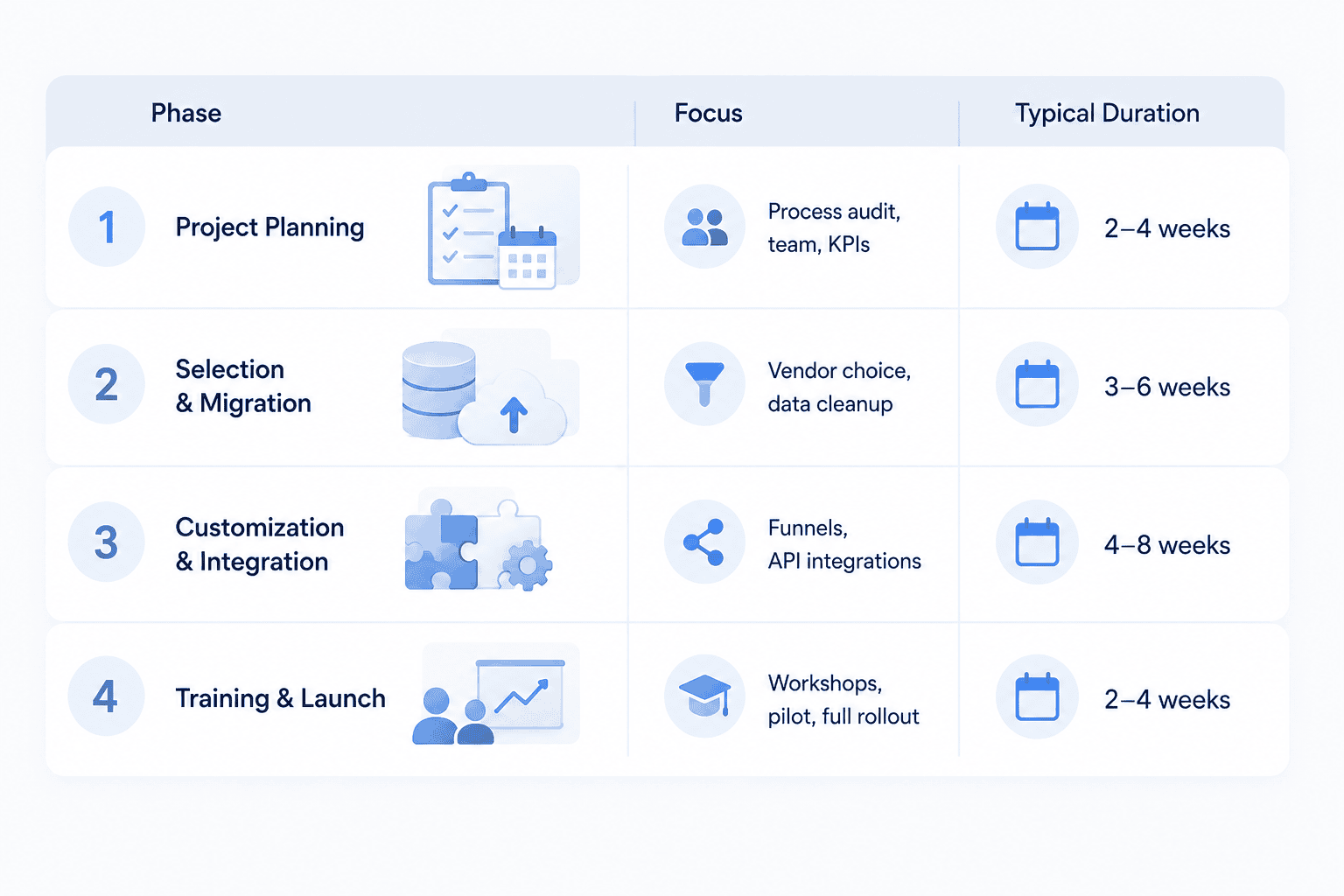
Following clearly defined CRM implementation steps gives every stakeholder a shared understanding of project goals, responsibilities, and timelines. A structured CRM implementation roadmap typically includes process analysis and project planning, CRM selection and data migration, system customization and API integrations, and finally, staff training and launch.
Phase 1: Creating a Project Plan for CRM Implementation
Before anyone touches software, audit your current "as-is" processes:
how leads are being put into the funnel now,
who owns each stage,
and where handoffs are currently failing.
Then:
appoint a project manager (in your organization or at the integrator) who has control over the timeline.
Choose internal curators (department leads) who will represent sales, support, and marketing.
Set specific goals and KPIs prior to hiring any vendor (“reduce lead response time from 24 hours to 2 hours”).
To put it in perspective, skipping the as-is audit is one of the major reasons a project plan for CRM implementation collapses in month two - teams have to customize the new system to repeat the same broken process they previously had.
Phase 2: Choosing the Right CRM & Data Migration
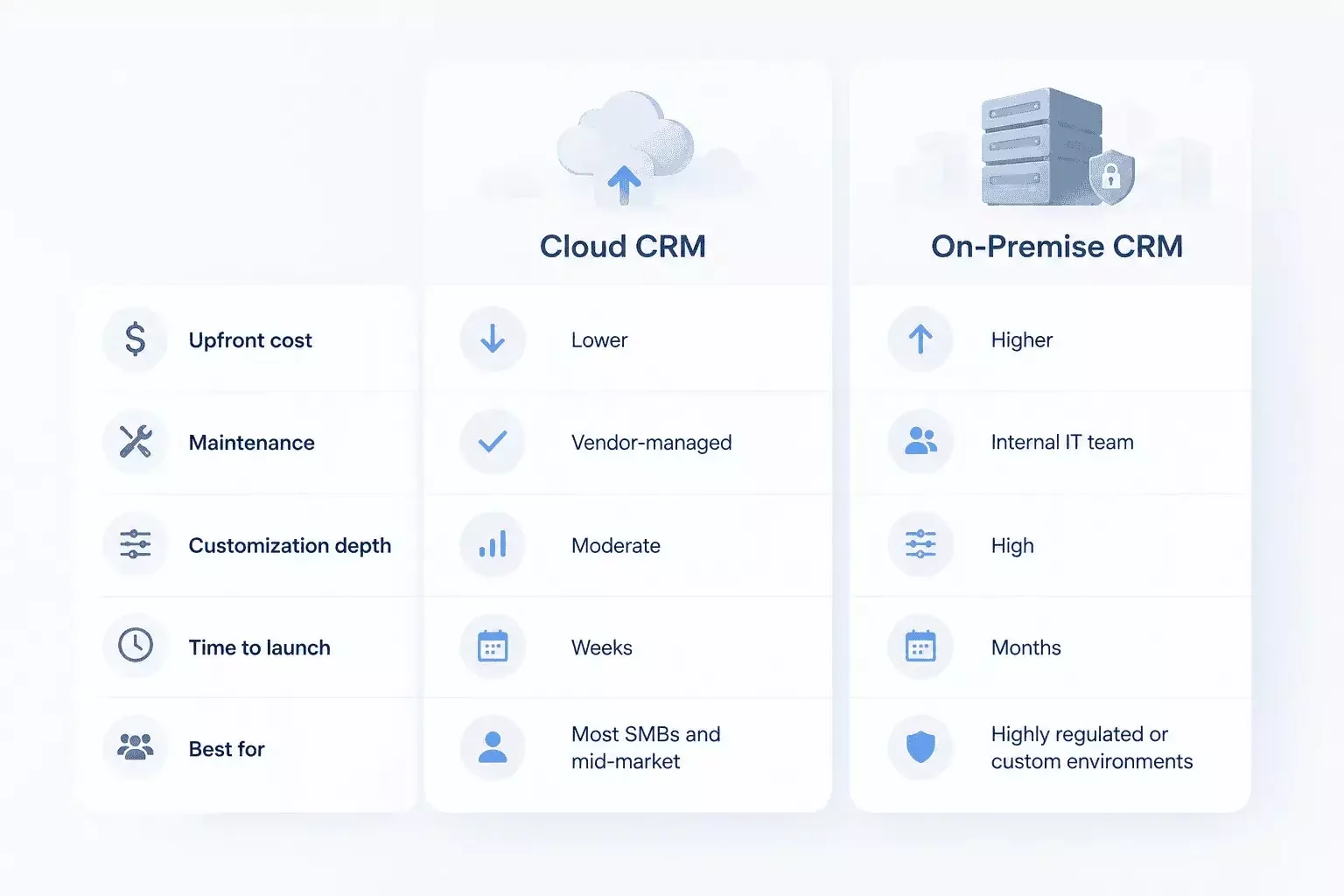
Choosing criteria tend to be divided into cloud vs. on-premise ("boxed") and niche/industry-specific tools vs. universal systems like Salesforce, HubSpot, or Zoho.
After selecting a platform, the data migration phase starts: it is not hard to clean duplicate records, standardize fields, and hand over data from legacy systems to a new one.
This is often overlooked—dirty data migrated into a shiny new CRM yields a shiny new mess.
Phase 3: System customization and integration
This stage is spent designing sales funnel design, client card layout, and pipeline process to match your actual sales process, not some generic model.
It also deals with API integrations with:
your website forms,
phone system (telephony),
messaging apps,
email,
and any connected ERP systems.
⚠️ Warning: over-customization is a real risk here. Every custom field and workflow rule adds long-term maintenance overhead.
A good rule of thumb: customize 20% of the process that is truly unique to your business and accept the vendor default for everything else.
Phase 4: Staff Training and Launch
A perfectly designed CRM is useless if the sales team doesn’t use it.
This includes:
Writing clear, role-specific instructions (not one 80-page manual for all).
Holding hands-on workshops rather than passive presentations.
Launching with a small pilot group before rolling out company-wide.
One mid-size logistics company we talked about ran a two-week pilot with five reps before doing a full rollout. The pilot uncovered three workflow gaps that would have led to a company-wide slowdown in the first week.
Summary: Your Quick CRM Implementation Roadmap
Use this CRM implementation roadmap as a practical framework for planning your project.
Keys to a Successful CRM Implementation: Best Practices
The keys to successful CRM implementation start with clearly defined business goals, measurable KPIs, strong project ownership, and employee involvement. Following proven CRM implementation best practices can help businesses introduce the system gradually, improve user adoption, and adapt workflows based on real feedback.
A successful CRM implementation should make daily operations easier rather than introduce unnecessary complexity. This means keeping the interface practical, automating repetitive processes strategically, and ensuring employees understand how the CRM supports their daily work.
Set clear goals and KPIs
Before anything is done, define what success actually looks like—
“cut ticket resolution time by 30%,”
or “increase quote-to-close rate by 15%,”
or whatever.
“Because everyone else has one,” a CRM “no longer gets a measurable return or value and you can’t justify your investment in the future.”
Top CRM Implementation Best Practices for Businesses
The best practices for business for CRM implementation that differentiates smooth rollouts from painful ones:
get leadership buy-in first. Executive sponsorship tells the whole company that this is not just a sideshow.
Not to have the whole company go through a revolution but to roll out in stages, not all at once.
Evolution is better than revolution - start with the core features and then add automation when it works, and then roll out automation if it works.
You should make the interface simpler for managers and reps. A CRM that takes ten clicks to log a call will be abandoned in a month.
You can’t get feedback every single time a call is recorded, not just in a post-launch survey— you should collect feedback all the time.
The keys to successful CRM implementation come from a five-person sales force or 500-person company— the scale of the team and the principles don’t change.
Common CRM Implementation Challenges & How to Avoid Them
The most common CRM implementation challenges typically involve technology, data quality, process design, and user adoption. Understanding the challenges of CRM implementation early allows the project team to identify potential risks before they affect the rollout.
Common CRM implementation issues include resistance from employees, incomplete data migration, poorly designed workflows, excessive customization, and difficulties connecting the CRM with legacy systems or third-party applications.
Technical and Adoption Issues
Most common problems with crm implementation fall into two categories.
The first is human: sales reps quietly turning to spreadsheets or email because “the old way was fine.”
The second is technical: the failure of the CRM to integrate with legacy systems that were never meant to connect through API.
ℹ️ Tip: adoption resistance is rarely about software itself, but more about the new workflow that adds steps that go hand in hand with the old one. Fix the workflow and the resistance goes away.
Why CRM implementations fail: Crucial Mistakes to avoid
Most common crm implementation mistakes are:
Choosing an overly complex platform for a team that needs simple lead management.
Skipping the KPI-setting step so that there’s no way to assess whether the project actually worked.
No ongoing monitoring of the sales team after the launch— no way to check if the sales team is actually tracking what’s happening in the system.
Over-predicting data migration and the resulting incomplete customer data, which will create a collection of inaccurate or duplicated customer records.
These problems of crm implementation remain unaddressed, and the crm implementation failure is achieved in the form of expensive licenses, an unused dashboard and a sales team back on spreadsheets within 6 months.
For almost every case we have seen, the solution is the same discipline: ownership, a plan with a planned rollout and feedback loops that are kept going from top to bottom (as in the best practices outlined above).
Understanding the potential causes of CRM implementation failure can help businesses address these risks before they affect user adoption and ROI. Clear ownership, realistic planning, employee training, and continuous optimization are essential for keeping the CRM aligned with actual business needs.
Conclusion & Next Step
A successful CRM implementation is not a one-off; it’s a structured project with clear phases, defined ownership and metrics that show that it worked.
By following the CRM implementation best practices outlined in this guide and using a clear CRM implementation roadmap, businesses can create a CRM environment that supports daily operations, improves visibility, and enables more data-driven decisions.